





A digital billboard is not just a bright screen on a road or building wall. It is a full display system made of LED modules, cabinets, power equipment, control hardware, software, and maintenance access. For buyers comparing digital billboard display options, system design matters as much as size. A better project starts by knowing what each part does.
Main Components of a Digital Billboard Display
A complete digital billboard display works like a chain. The LED screen shows the image, the controller sends the signal, the power system keeps the screen running, and the software helps operators manage content. The table below gives a quick view of the main system layers before we look at each one in detail.
| System Part | Main Function | Buyer Check |
| LED modules | Create the image | Pixel pitch, brightness, color quality |
| Cabinets | Hold modules and components | Size, weight, access, protection |
| Power supply | Feeds electrical power | Stability, load design, redundancy |
| Control system | Sends image data to the screen | Sending card, receiving card, controller |
| Software | Manages content and scheduling | Remote publishing, monitoring, access control |
| Structure and access | Supports installation and maintenance | Mounting method, service space, safety |
Each part affects the final performance. A reliable digital billboard system should be reviewed as a complete project, not as separate parts.
LED Modules and Pixel Pitch
LED means Light Emitting Diode. In a billboard screen, LEDs are arranged on modules to create images, text, and video. Pixel pitch means the distance between LED pixels, measured in millimeters. A smaller pixel pitch supports clearer detail at closer viewing distances, while a wider pitch can work for long-distance roadside viewing.
Cabinets and Structural Frame
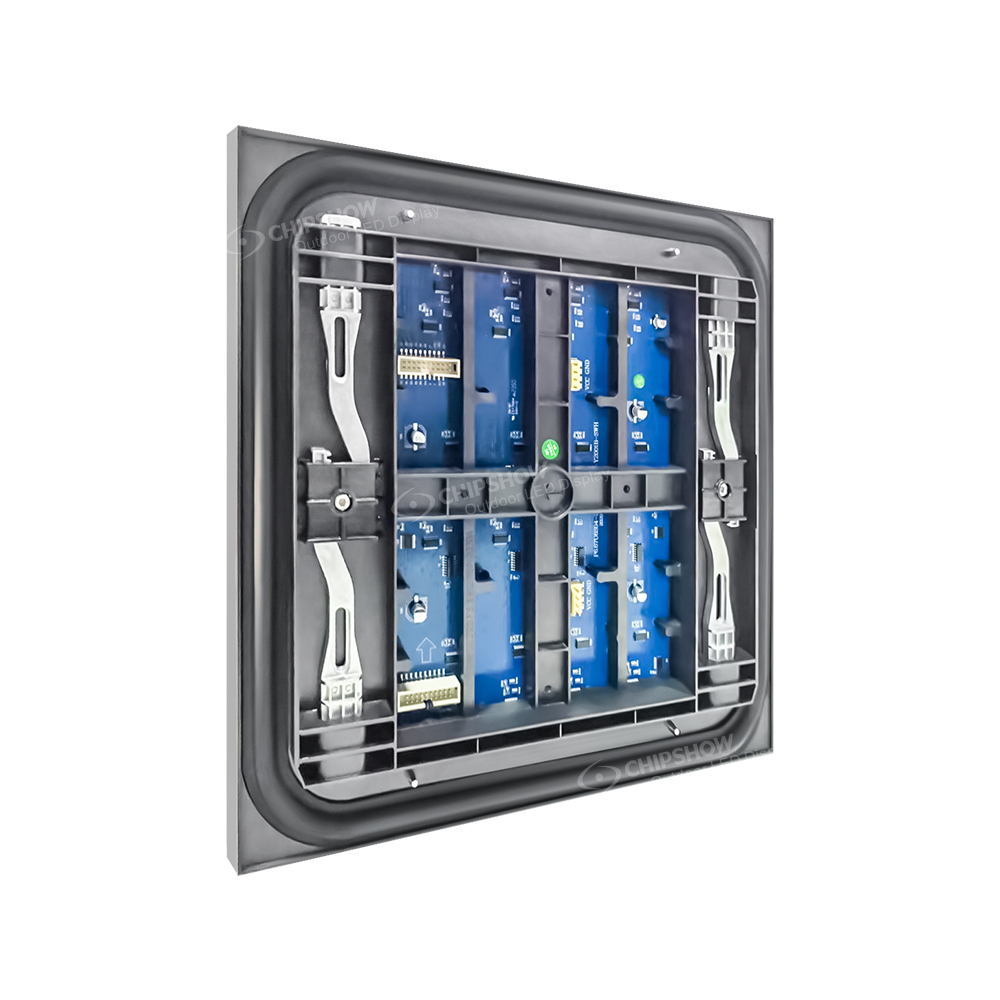
A cabinet is the enclosure that holds LED modules, power parts, receiving cards, and cables. Cabinets connect together to form the full screen size. For outdoor projects, cabinet design affects installation, waterproofing, service access, and long-term maintenance. Buyers should check cabinet size, material, weight, and front or rear maintenance options before confirming the layout.
Power Supply and Distribution
A power supply converts incoming electricity into the correct voltage for the LED display system. Power distribution decides how electricity is divided across the screen. For large digital billboard screens, balanced power planning helps support stable brightness and easier maintenance. Buyers should request a power distribution diagram before ordering.
Sending Card, Receiving Card, and Controller
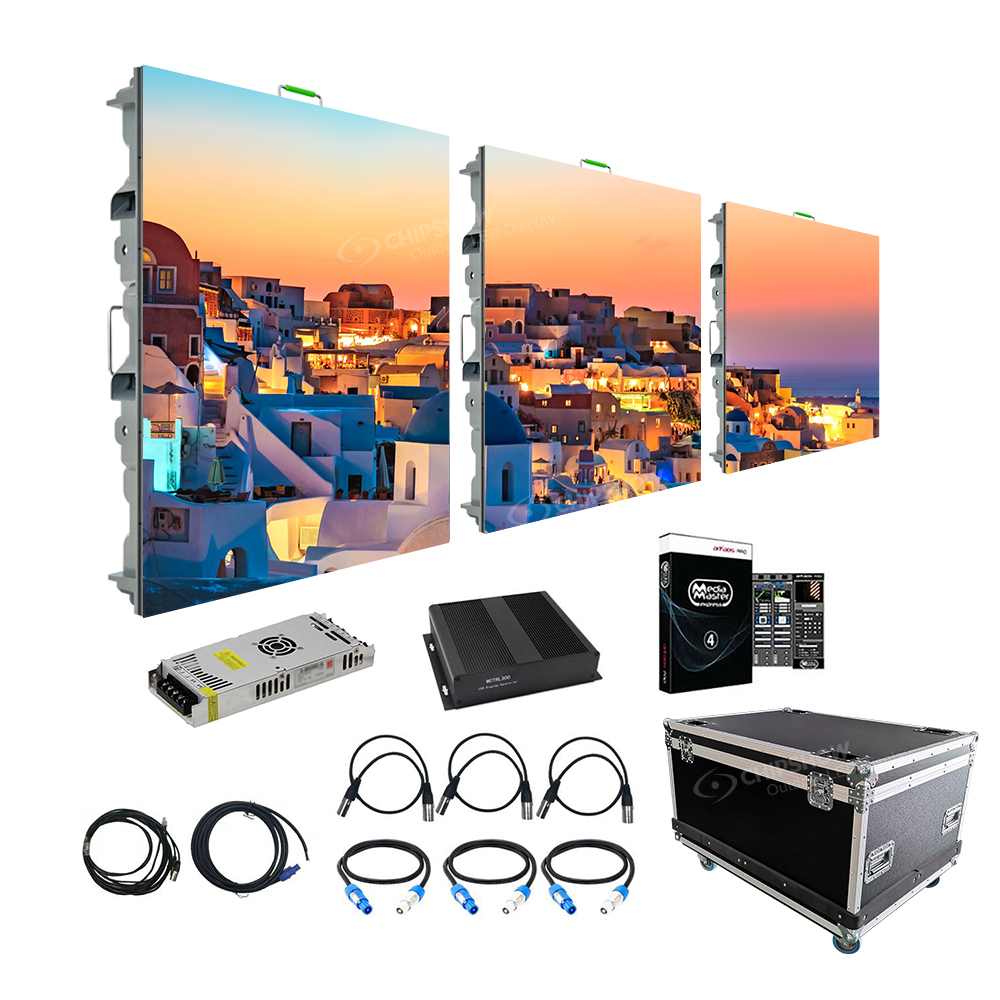
The control system tells the digital billboard what to show. A sending card sends image data from the media player or processor to the screen system. A receiving card distributes that data inside the cabinets, while the controller helps manage signal processing and screen mapping. These parts should match the screen resolution, cabinet layout, and content source.
How Digital Billboard Software Works in Real Projects
Digital billboard software is used to manage content. It can help operators upload ads, schedule playlists, publish updates remotely, and monitor playback status. This software layer is often called a Content Management System, or CMS.
A CMS can support:
- Campaign scheduling
- Remote content publishing
- Playlist management
- User permission control
- Playback logs
- Basic screen status monitoring
The control system may use third-party or project-specific software for content scheduling, remote publishing, and monitoring. This is important for buyers to confirm early. Not every project uses the same software workflow, and not every LED supplier provides the full advertising management platform.
For best results, buyers should define how content will be updated. A single local billboard may need simple scheduling. A multi-location network may need remote access, user roles, proof of play, and monitoring across different sites.
Software should be discussed before installation, not after the screen is already built.
Why Power and Cooling Design Matter
Outdoor digital billboard screens often run for long hours in sunlight, heat, rain, dust, and changing weather. Power and cooling design affect brightness stability, component stress, maintenance frequency, and long-term operating cost.
Heat Dissipation in High-Brightness Environments
Heat dissipation means moving heat away from electrical components. Outdoor LED billboards need high brightness, so they generate heat during operation. If heat is not managed well, LED modules, power supplies, and driver components may face more stress.
Good heat design starts with cabinet structure, airflow, power efficiency, and material selection. Some outdoor LED display cabinets use metal structures to help move heat away from key components. Efficient power designs can also reduce unnecessary heat.
Buyers should check how the system manages heat under high-brightness operation, especially for hot climates or screens that run many hours per day.
Power Stability and Redundancy Design
Redundancy means having backup capacity when one part fails or becomes overloaded. In digital billboard systems, power stability is important because the screen may serve paid advertising campaigns every day. A strong power plan should consider load balance, cable routing, protection devices, and easy service access. For larger projects, buyers may ask whether critical parts can be designed with backup paths or spare capacity.
Stable power helps protect image consistency. It also makes maintenance planning easier because technicians can identify and service power sections more clearly.
Weather Impact on System Reliability
Outdoor screens face rain, dust, humidity, wind, sunlight, and temperature swings. That is why IP rating matters. IP rating shows how well equipment resists dust and water.
For outdoor digital billboard signs, buyers should check front and rear protection, sealing design, wiring protection, and cabinet access. The system should also be suitable for the local operating temperature range.
Chipshow outdoor LED display specifications include IP65 protection in selected outdoor configurations and outdoor advertising applications such as road advertising, commercial real estate, sports, cultural tourism, and public projects. For project reference, buyers can review Chipshow’s outdoor fixed LED display installation reference when discussing installation and maintenance access.
Buyer Document Checklist Before Ordering a Digital Billboard System
A digital billboard should be ordered with documents, not just a price and screen size. Technical files help buyers compare suppliers, plan installation, and reduce project risk.
Before placing an order, ask for:
- LED screen specification: Confirms pixel pitch, brightness, refresh rate, cabinet size, power data, protection level, and operating conditions.
- Cabinet drawing: Shows physical cabinet size, module layout, service method, cable routing, and mounting points.
- Power distribution diagram: Explains how power is divided across the screen and what electrical capacity is required.
- Control system diagram: Shows how the controller, sending card, receiving cards, media player, and signal path connect.
- Spare parts list: Helps the buyer plan long-term maintenance and reduce downtime.
- Maintenance access plan: Confirms whether the project needs front service, rear service, or both.
- Installation environment notes: Records wind, sun exposure, wall structure, road location, and service access conditions.
These documents make supplier communication much clearer. They also help the buyer see whether a quote covers a complete digital billboard display system or only part of the screen hardware.
Common Mistakes When Comparing Digital Billboard Systems
Many buyers compare only the visible screen. That can lead to weak project decisions because the display surface is only one part of the system.
Common mistakes include:
- Comparing screen size without checking pixel pitch
- Asking for brightness without confirming local sunlight conditions
- Ignoring power distribution until installation
- Forgetting service access behind or in front of the screen
- Treating software as an afterthought
- Failing to request cabinet and control system diagrams
- Choosing a screen before confirming structure and environment
A digital billboard system should match the full project. The right configuration for a roadside billboard may not be the same as the right setup for a plaza, storefront, or building wall.
How Chipshow Supports Digital Billboard Display Projects
Chipshow provides outdoor LED display solutions for advertising, road media, commercial squares, storefronts, sports venues, and public display projects. For buyers planning digital billboard signs, the main value is not only the LED surface. It is the ability to match screen configuration, cabinet structure, brightness, maintenance access, and control requirements to the project.
Chipshow outdoor LED display specifications include options such as high-brightness LED configurations, modular cabinet structures, front and rear maintenance in relevant models, IP65 protection in selected outdoor designs, and control system configuration support for outdoor advertising applications.
For buyers, this means the project discussion can move beyond “how big is the screen” to more practical questions:
- What viewing distance should the screen support?
- What brightness level does the site need?
- How will the cabinet be installed and serviced?
- What power and signal layout is required?
- What software workflow will the operator use?
A clear technical conversation helps turn a digital billboard idea into a working display system.
Evaluate the Full Digital Billboard System
A digital billboard should be evaluated as a complete system, not just a screen surface. LED modules, cabinets, power distribution, cooling, control hardware, software, and maintenance access all affect long-term performance. Share your site conditions, target screen size, viewing distance, operating hours, and content workflow with Chipshow to plan a digital billboard display that fits both the advertising goal and the installation environment.
Remote Power Cycling: What Should the Operator Confirm?
Remote content updates and remote power cycling are different functions. Confirm whether the proposed system supports a player restart, controller restart, or an approved power-control device, and identify who can operate each function.
Ask for access controls, restart logs, the required shutdown sequence, expected recovery behavior, and a local service route when remote control fails. Have the electrical designer and operator approve any power-control arrangement before it enters the operating procedure.
FAQs
Q1. What Is Included in a Digital Billboard Display System?
A digital billboard display system usually includes LED modules, cabinets, power supplies, control hardware, cables, software, and mounting support. Some projects may also require a media player, sensor equipment, network connection, and monitoring tools. The final system depends on screen size, site type, and content workflow.
Q2. Are Digital Billboard Screens Controlled Remotely?
Many digital billboard screens can be controlled remotely when the project includes suitable software, network access, and control hardware. Remote control may support content upload, scheduling, playlist changes, and basic status checks. Buyers should confirm the software workflow before ordering.
Q3. Why Is Power Design Important for Digital Billboard Signs?
Power design affects brightness stability, heat, safety, and maintenance. A large outdoor screen needs balanced power distribution so each screen section receives stable electricity. Buyers should request a power distribution diagram before confirming the system.
Q4. Is Software Included With Every Digital Billboard?
Not always. Some digital billboard projects use third-party or project-specific software for scheduling, remote publishing, and monitoring. Buyers should confirm whether software, media player hardware, training, and remote access are included in the quotation.





