





Smart pole LED planning works best when you treat emergency alerts, sensors, and 5G as separate functions that share a pole, not as one plug-and-play package. For municipal teams, the real question is whether a smart pole LED site has enough power, backhaul, service access, and approval headroom to host all three without creating a maintenance problem later.

Where Smart Poles Fit in Municipal Networks
A smart pole LED system is most useful when a city wants lighting plus public information or network infrastructure in the same streetscape. In practice, that can mean a downtown corridor with alert messaging, environmental sensors, or a future small-cell path, but each use case should be judged on its own. The municipal small-cell context helps explain why cities often reuse existing poles instead of building separate structures.
The key boundary is this: smart city LED pole integration is not a default answer for every block or every department. If a project needs emergency alerting, sensor monitoring, and 5G density in one footprint, the pole has to fit the site plan, utility coordination, and local approvals first. If that chain does not close, a simpler lighting or display-only design is usually the better fit.
A smart city pole deployment may still be relevant as a navigation path when planners are comparing street-side display options, but the decision should start with the use case, not the hardware brochure.
Integration Architecture That Holds Up
For most municipal projects, the safest way to think about the system is as four layers: power, controls, communications, and payloads. That separation lets you size the lighting circuit, the alert endpoint, the sensor package, and any 5G radio or edge device without assuming they all behave the same way. In public-safety systems, edge computing for public safety alerts can help reduce delay and keep localized response available when network conditions are not perfect.
Power and Control Segmentation
If a pole carries more than one function, do not assume one power budget covers all of them. Lighting, displays, cameras, sensors, and radios may have different duty cycles and different failure consequences. A design that isolates power and control channels is easier to troubleshoot and less likely to take down every function at once.
This matters most when a municipality expects the pole to do more than routine illumination. A display-only system can be acceptable for a simpler streetscape, while a multi-function pole needs enough electrical headroom and control logic to keep alerting and telemetry from competing for the same path.
Communications and Backhaul
Backhaul choice changes how the pole behaves operationally. Fiber, cellular, or another managed connection may all work in the right setting, but they do not create the same latency, uptime, or remote-update profile. That is why emergency messaging should not be designed the same way as low-priority sensor reporting. The edge computing for public safety alerts source is useful here because it ties low-latency response to architecture, not just to hardware labels.
What this means for buyers is simple: if the network is only good enough for routine telemetry, it may not be enough for a time-sensitive alert workflow. If the project depends on quick local response, confirm who owns the network handoff, how updates are handled, and what happens when connectivity is degraded.
Physical Mounting and Service Access
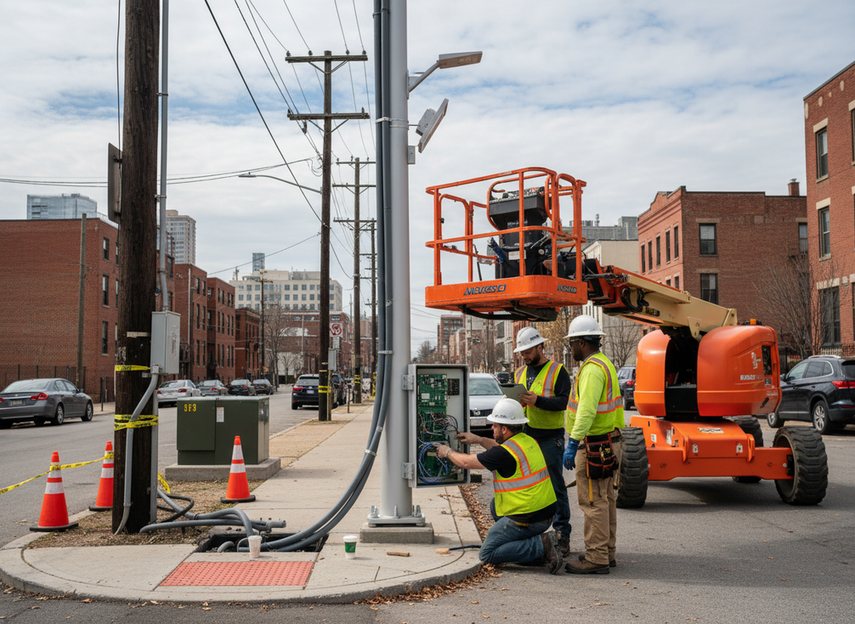
Maintenance access is a design issue, not an afterthought. Shared poles should still let technicians isolate one component without disturbing the others, especially when a single service call would otherwise affect lighting, signage, or comms. Labeled access points, clear cable routing, and reachable service panels reduce field errors and shorten repair time.
If the pole is easy to mount but hard to service, the city may save money on purchase day and pay for it later in truck rolls. That tradeoff becomes more obvious once the deployment includes more than one vendor, because every extra device adds a possible point of failure.
Weather, Load, and Thermal Planning
Wind load, heat buildup, and ingress protection should be treated as engineering checks, not assumed defaults. Radios, processors, and displays create different thermal loads, and those differences matter when the pole sits in a hot, sunny corridor or a windy right-of-way. A site that looks fine on paper can still need a structural review before deployment.
For municipal buyers, the practical rule is to plan for the worst component, not the least demanding one. If the enclosure cannot handle the load, heat, and weather of the full system, the integration should be simplified before procurement moves forward.
Street pole LED display systems are worth comparing only after the architecture questions are settled, because hardware that works for display duty alone may not be the right fit for alerting or future radios.
| Planning Factor | Why It Matters | What To Verify | Common Deployment Risk |
|---|---|---|---|
| Power segmentation | Determines whether lighting, alerts, sensors, and radios can run without overload conflicts | Available circuit capacity, protected branches, and recovery behavior | One added device forces a redesign |
| Communications / backhaul | Controls latency, uptime, and remote management | Network ownership, handoff point, and update path | Routine telemetry is mistaken for alert readiness |
| Physical service access | Affects repair time and downtime | Access panels, cable labels, and isolation points | Field service requires shutting down the whole pole |
| Weather / load / thermal planning | Keeps the pole safe and stable in real conditions | Structure review, enclosure fit, and heat management | Equipment fits physically but not operationally |
Power, Backhaul, and Maintenance Tradeoffs
The biggest budget risk is usually not the display itself. It is the way shared infrastructure turns into shared complexity. A cheaper upfront design can look attractive if it only covers lighting or a single display, but maintenance costs rise when the city later tries to add radios, sensors, or alerting.
| Planning Factor | Why It Matters | What To Verify | Common Deployment Risk |
|---|---|---|---|
| Available power | Sets the ceiling for what can be added later | Spare capacity and isolation between loads | No room for future expansion |
| Backhaul reliability | Affects how well alerts and telemetry stay connected | Service levels, failover expectations, and ownership | The system works in testing but fails under disruption |
| Service access | Determines how fast repairs can happen | Panel layout, reach, and part replacement path | Every maintenance visit becomes a full shutdown |
| Remote monitoring | Reduces truck rolls and speeds fault detection | Device status, logs, and update workflow | Problems are found only after visible failure |
| Expansion headroom | Protects the project from early obsolescence | Space, cooling, and utility allowance | A future upgrade becomes a full retrofit |
For a corridor pilot, this is where smart pole LED planning either stays manageable or becomes expensive. If the team needs frequent field visits, remote monitoring is not optional. If the site has no expansion headroom, adding a 5G small cell later may be harder than planned.
Emergency Alert Delivery and Sensor Coordination
Emergency alerting has to start with the approved command path, not with the display itself. FEMA’s IPAWS overview is the cleanest boundary here: authenticated emergency messages flow through an official alerting ecosystem, and the pole acts as a delivery endpoint within that workflow. That distinction matters because a connected screen, speaker, or radio is not automatically the authority for a public alert.
Alert Trigger Path
The reader-friendly sequence is simple: approved trigger, validated message, pole output, then logging and follow-up. That sequence keeps emergency content separate from routine content and makes it easier to prove what happened later. If the chain is undocumented, the project may look connected without actually being ready for an incident.
A good rule of thumb is to define the message source before defining the pole behavior. That is the difference between a display that happens to be online and a public-alert endpoint that fits municipal operations.
Sensor Data Inputs
Sensors should inform operations, not become a shortcut for emergency authority. Traffic counts, occupancy, environmental readings, or equipment status can help operators decide what to do, but those inputs should remain separate from the command path that pushes an official message. Mixed naming or unclear ownership is where many projects get messy.
This is also where low-latency architecture matters. The IoT-based public safety systems literature supports the idea that heterogeneous sensors and edge computing can help with local response, but that is a system-design benefit, not a guarantee that the site will handle every alert type.
Priority Rules and Manual Override
Emergency messages should take precedence over routine content. If the pole is also used for wayfinding, ads, or public information, the project needs a clear rule for what pauses, what resumes, and who can override the system. Manual override and fail-safe behavior should be written down before deployment, not improvised during an incident.
This is one of the clearest decision points in the whole project: if the pole cannot preserve alert precedence under normal operating conditions, it is not a good candidate for public alert deployment. If the system can document override logic and operator permissions, it is much easier to defend in a municipal review.
Testing and Drills
Testing should confirm more than visual output. The team should verify delivery, logging, recovery behavior, and the way the system returns to normal service after an alert. Drills also expose a simple but common problem: a design that is technically connected may still be operationally awkward when staff need to use it under time pressure.
For that reason, smart pole LED emergency broadcast plans should include a test schedule that fits local policy and maintenance windows. A project that never rehearses recovery is risky even if the hardware looks ready on day one.
Ordinance, Approval, and Deployment Checklist
5G integration on a pole brings a different approval path than a lighting-only upgrade. Federal policy shapes the small-cell environment, but cities still control the actual municipal process, especially in the right-of-way. The small-cell deployment rules matter because they frame why local permitting, utility coordination, and design review still affect the schedule.
An official example helps show how local process works in practice. Arlington County’s municipal permitting example shows that cities commonly organize small-cell review around documentation, site conditions, and approval steps rather than treating the pole as a generic accessory. That is the right mental model for smart pole projects too.
- Verify right-of-way and utility ownership first, because the pole may sit on land or infrastructure that needs more than one sign-off.
- Check local sign, lighting, and aesthetic rules early, since a pole that meets one department’s needs can still fail another’s review.
- Confirm how RF equipment, antennas, or edge devices will be documented, because equipment layout can change the approval path.
- Define cybersecurity and data-governance ownership before procurement, so it is clear who manages updates, access, and logs.
- Review maintenance responsibility in writing, because multi-vendor poles often create confusion after installation.
- Evaluate sightlines and neighborhood impact before final placement, especially on visible corridors and downtown blocks.
- Treat community review as part of the deployment schedule, not as an optional extra.
One useful decision sentence: if the approval path is still unclear, the project is not ready for procurement. If the permit path, utility coordination, and maintenance ownership are all mapped, the rollout can move forward with less risk of redesign later.
Selection Checklist for Connected Pole Projects
Use this sequence when you are comparing vendors or preparing an RFP for smart pole LED integration. It keeps the decision grounded in site reality instead of brochure claims.
- Define the main use case first. Decide whether the pole is for emergency messaging, sensor monitoring, 5G densification, or a phased mix of all three.
- Confirm power and backhaul together. A site with spare power but weak connectivity, or strong connectivity but no electrical headroom, is still incomplete.
- Verify physical and cybersecurity requirements. Ask how the system is mounted, serviced, accessed, and updated.
- Check municipal approvals before final pricing. Right-of-way, utility, and local design rules can change what is feasible.
- Plan maintenance and pilot success criteria. A good pilot should show how alerts, telemetry, and recovery work in real operating conditions, not only on installation day.
If you are still comparing product paths, start with a smart city display or a street pole LED display only after you know which functions must be supported now and which can wait for a later phase.
The safest next step is to review site requirements, compare integration paths, and request a spec consultation before procurement. That way, the project team can separate what the pole should do today from what it may need to support later, including public alerting and future network expansion.
Wrap-Up
The best smart pole LED project is the one that matches the site, the approvals, and the service plan before it tries to support every feature at once. Start with the use case, verify the infrastructure, and then decide whether the pole should support alerts, sensing, 5G, or a phased mix.
FAQs
Can Smart Pole LED Displays Integrate With 5G and IoT Sensors?
Yes, in some designs they can, but only when power, backhaul, service access, and documentation all support the combined load. The real test is not whether the pole can accept multiple devices, but whether the full system can stay maintainable and operational after those devices are added.
What Should a Municipality Verify Before Using a Pole for Emergency Alerts?
The city should verify the approved alert source, the pole’s delivery role, the precedence rules, and the testing plan. A connected pole can relay an official message, but it should not be treated as the authority for that message unless the alert workflow and local policy say so.
How Do Power and Backhaul Limit Smart Pole Expansion?
Power limits how many devices the pole can support, while backhaul limits how reliably those devices can communicate. If either one is tight, the project may still work for lighting or simple signage, but later expansion into sensors or 5G can trigger a redesign.
What Maintenance Issues Appear in Multi-Function Smart Poles?
The most common issues are hard-to-reach service points, unclear part ownership, and too many devices sharing one enclosure. Remote monitoring, labeled cable paths, and modular access reduce field time, especially when the pole has to stay online for public-facing functions.
Can a Smart Pole Be Designed for Future 5G Small-Cell Additions?
Yes, but future-proofing has to be designed in from the start. The pole needs room for load, cooling, power, and backhaul headroom, and the city still has to clear the approval path when the upgrade is actually added.





