





Outdoor LED sign uptime is a revenue problem before it is a technical one. If a roadside or urban panel goes dark, the missed impressions, interrupted campaigns, and extra service coordination can ripple through the whole network. In programmatic DOOH, stable connectivity and live screen status matter because ads need to serve and measure consistently, so even a short outage can create a larger operational headache than the fault itself. 
Why Outdoor Downtime Hurts Revenue
For most operators, downtime is not just a screen issue. It is lost delivery against a sold campaign, a risk to sponsor confidence, and an interruption to scheduling that other sites may have to absorb. That is why outdoor LED sign uptime belongs in the same conversation as revenue protection, not just field maintenance.
The modern DOOH model also raises the stakes. Programmatic DOOH depends on stable connectivity and screen availability, so a dark display can affect reporting, pacing, and fill across the network. You do not need a precise revenue number to see the effect: if one panel fails during a live campaign, the team has to solve both the fault and the customer-facing fallout.
A good strategy starts with a simple judgment. If the network is sold on tight delivery windows, uptime planning should be treated as an operating system, not a cleanup task. If the site is low-traffic and easy to reach, the cost of a slow repair may be smaller, but the panel still needs a clear recovery path.
Common Failure Points in Outdoor LED Networks
Outdoor LED billboard downtime usually comes from a few recurring categories, and the fastest repairs start with the right category. The OAAA digital billboard guidance is a useful anchor here because outdoor billboards commonly rely on ambient-light sensing or similar control systems to keep brightness appropriate for visibility and safety. When a display goes dark or behaves oddly, the first question is often not "what part is bad?" but "which system layer failed first?"
Front-Access Service Limits
Restricted rear clearance, tight roadside mounts, and cramped rooftops can slow service more than the fault itself. A front-service LED billboard service layout can reduce the amount of climbing, repositioning, and teardown a crew needs, but only when the cabinet and mounting design actually support it. In a crowded urban site, that difference can matter a lot. In a roomy install with easy rear access, it may matter less.
Heat, Dust, and Weather Stress
Heat, moisture, dust, and seasonal weather swings can all raise wear on high-brightness LED sign reliability. The operator takeaway is simple: outdoor durability does not remove the need for inspection. If a site runs hot, collects road dust, or sees storm exposure, service intervals usually need more attention, not less. Treat ventilation, sealing, and cleaning as risk reduction, not as a promise that failures will stop.
Power, Control, and Signal Interruptions
Some outages are really power, controller, or data-feed problems. Others are content-path issues that only look like hardware failures at first glance. That is why remote diagnostics matter: they help classify the fault before a truck roll. The remote diagnostics workflow should narrow the problem domain, not replace field service. If the alert says the cabinet is healthy but the content is frozen, the response is different from a power or controller fault.
Spare Parts and Field Response Delays
A small fault can become a long outage when the right replacement is not on hand. Missing modules, power supplies, cables, or control parts can turn one site visit into two. For operators who cover multiple cities, the spare-kit question is not "what parts seem useful?" but "what parts are most likely to stop service or lengthen recovery for this fleet?"
Design for Faster Front-Service Repairs
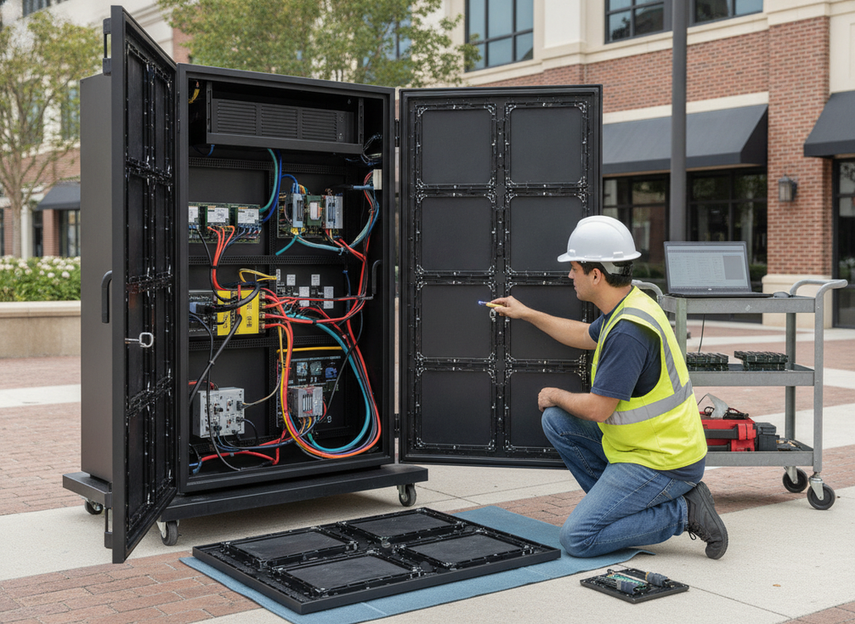
Front-service access helps most when the site itself makes rear access painful. That is often true for roadside signs, tight urban installs, and locations with limited service clearance. In those settings, cabinet access can change how long the crew spends on-site and how quickly the campaign can be restored.
The practical check is straightforward. Can the crew reach the likely failure point without major teardown? Can they swap modules, inspect power sections, and verify labels without improvising? If the answer is no, the site is probably asking for more downtime than necessary.
Cabinet Access and Module Replacement
A cabinet that opens from the front can make module swaps and basic troubleshooting easier when rear access is blocked. That does not mean every front-access design is equally fast, though. Latch design, labeling, cable reach, and the position of common parts all matter. In practice, front-service cabinet workflow is most valuable when it shortens the path from fault to fix, not when it merely changes where the crew stands.
Safe Workflows for Elevated or Roadside Sites
Uptime and safety are linked because a slow or awkward access path can delay repairs and create unnecessary repeat visits. The site plan should account for lifts, traffic control, fall protection, and local rules before the first outage happens. If the crew has to spend half the visit just setting up access, the service design is not doing enough work.
Serviceability Checks Before Deployment
Before a network goes live, ask whether the most common service tasks can be done with ordinary tools, clear labeling, and enough clearance for the technician to work cleanly. This is especially important for outdoor maintenance access planning in distributed networks, where a small access problem can become a repeat dispatch pattern. If a cabinet looks sleek but is hard to open, hard to read, or hard to reach, it is probably a poor uptime fit.
Build a Spare Parts and Maintenance Schedule
A written schedule is one of the most effective ways to improve outdoor LED sign uptime because it stops service from becoming purely reactive. The OAAA DOOH technology guide shows that DOOH maintenance may be handled by owner teams, integrators, or turnkey service models, which means the schedule has to fit the operating model as well as the hardware.
The right cadence is site-specific. A downtown panel with heavy road dust, a coastal sign, and a sheltered indoor-facing display do not need the same rhythm. The useful question is not "what is the universal frequency?" but "what should be checked often enough to catch small faults before they become dark-panel events?"
| Maintenance task | Typical cadence | What it protects | Downtime risk if skipped | Who owns it |
|---|---|---|---|---|
| Visual inspection | Routine, with extra checks after storms or service calls | Early fault detection, loose hardware, visible damage | Small issues linger until they spread | Field service or local ops |
| Cleaning | Site-dependent, often more often in dusty or high-traffic areas | Airflow, visibility, surface condition | Heat and grime can build up | Ops team or service partner |
| Seal and enclosure checks | Routine and after harsh weather | Moisture and dust ingress risk | Intermittent or hidden faults | Technician |
| Thermal checks | Routine in hot or sun-exposed sites | Heat stress and fan or airflow issues | Higher wear or unexpected shutdowns | Technician or remote monitor |
| Spare-parts review | Regular, especially after failures | Module, power, cable, and controller readiness | Longer recovery and repeat visits | Inventory owner |
| Controller verification | On schedule and after content or network changes | Signal path and control stability | False outage alarms or frozen content | Network ops |
| Post-weather inspection | Triggered by storms, wind, or heavy dust | Damage that may not be visible at first glance | Delayed failure after the event | Field service |
The point of a maintenance schedule is not to guarantee uptime. It is to make recovery faster, more predictable, and less dependent on luck. If the schedule is being followed but outages still cluster in one site, that is a sign to inspect access, thermal load, or spare-kit fit more closely.
Use Thermal Management to Protect Reliability
Heat matters because outdoor displays run under load for long hours, often in direct sun and changing weather. When airflow is poor or vents are blocked, internal stress can rise and service intervals can tighten. That does not mean heat alone explains every failure, but it does mean thermal management belongs in any serious uptime plan.
Ventilation, Airflow, and Heat Rejection
Keep the focus on what you can inspect: blocked vents, dust buildup, fan condition, and cabinet design. If airflow is poor, a display may still work today and fail sooner than expected later. The decision rule is practical: if a site sits in direct sun or has high power density, airflow deserves more attention than it would in a sheltered location.
Cleaning and Seal Checks by Season
Cleaning and seal inspection are simple tasks with a large downside if ignored. Dust can affect airflow, and worn seals can let in moisture or debris. A heavier schedule often makes sense after storms, pollen season, or long stretches of road dust. The goal is not perfection. It is catching visible wear before it turns into a service call.
Weather-Driven Inspection Priorities
After extreme heat, freeze-thaw changes, strong wind, or a major storm, treat the site as a higher-priority check. That is especially true for distributed networks where one weather event can affect multiple panels at once. The right response is not panic. It is faster triage on the sites most likely to have hidden damage.

Monitor Problems Before Panels Go Dark
Remote monitoring is most useful when it shortens the path from alert to action. The digital billboard security guidelines emphasize remote diagnostics and secure access because they help teams identify and resolve faults before they become bigger outages. That is triage support, not a substitute for field work.
Use the alert stream to answer five questions in order:
- Is the issue power, signal, content, or hardware?
- Is the fault isolated to one cabinet, one module, or the whole display?
- Is the panel dark, partially lit, dim, or frozen on content?
- Can the issue be verified remotely, or does it need a site visit?
- Which part, technician, or escalation path should be dispatched first?
That sequence helps avoid the most common mistake: sending a crew before the fault is even classified. For many operators, the best monitoring setup is the one that separates content problems from hardware problems quickly enough to reduce avoidable truck rolls. It still will not solve every outage remotely, and it should not be treated as a full replacement for on-site service.
Uptime Readiness Checklist
Before the next outage hits, verify five things: the cabinet or sign is accessible enough for normal service, the spare kit matches the fleet’s likely failure parts, inspections have a real cadence, alerts route to the right person fast, and escalation ownership is written down. If one of those pieces is missing, the recovery process will probably be slower than it needs to be. The best uptime plans are simple, repeatable, and reviewed after each service event.
FAQs
How Often Should Outdoor LED Displays Be Inspected?
Inspection cadence should match site exposure, traffic, and weather risk rather than follow one universal rule. Busy roadside signs and dust-prone sites usually need more attention than sheltered installs. A practical plan combines routine checks with extra inspections after storms, heat spikes, or service calls.
What Remote Alerts Matter Most for Billboard Downtime?
The most useful alerts are the ones tied to a clear response, especially power loss, controller faults, signal interruption, and abnormal brightness or thermal behavior. If an alert does not tell the operator what to check next, it is less useful than a simpler alert that does.
Can Front-Access Design Reduce Service Time?
It can, especially where rear access is limited or awkward. The real benefit depends on cabinet layout, labeling, latch design, tool access, and the crew’s workflow. In a simple site with easy rear clearance, the gain may be smaller.
What Spare Parts Should a DOOH Network Keep on Hand?
Start with the parts most likely to stop service or stretch recovery, such as modules, power supplies, cables, and control components. The right mix depends on the fleet’s hardware and geography. A small, well-matched kit is usually better than a large pile of mismatched parts.
Why Does Heat Matter So Much for Outdoor LED Reliability?
Heat raises stress on outdoor electronics and can compound dust, airflow, and enclosure problems. That is why thermal checks are preventive work, not a guaranteed fix. If a site runs hot or sees direct sun, the thermal plan should be tighter.





