





Government LED wall cybersecurity is not about treating the screen as dangerous by itself. It is about recognizing that a command center LED wall can sit inside the same operator workflow, network path, and service process as the rest of the room. For government and sensitive-facility buyers, the right question is not "Is it secure?" It is "Which controls are documented, who can touch them, and what changes during maintenance or update events?"
Why Command Center LED Walls Raise Security Questions
A command center display can become part of the control-room attack surface because it may connect to sources, controllers, management software, and support workflows. In a SOC or EOC, that means the wall can influence what operators see, what sources are exposed, and who can change layouts or inputs. The risk is less about the panel glass and more about the system around it.
That is why buyers should treat government LED wall cybersecurity as a procurement verification exercise. The 2026 CUI baseline update for government contractors handling sensitive information raises the bar on documented security expectations, so "mission-critical" branding is not enough on its own. A vendor should be able to show the controls in writing, not just describe them in a demo. The CUI security baseline for government contractors is part of that procurement context.
A practical decision sentence is this: if the wall touches content sources, admin tools, or remote support, you should evaluate it like part of the room’s security stack; if it is truly isolated and never shares control paths, the review can be narrower, but that isolation still needs proof.
What RBAC Means for Video Walls
RBAC, or role-based access control, means different people get different levels of control. For a video wall, that usually means operators can run approved actions, administrators can change layouts and settings, and service users can only do the maintenance tasks that are actually necessary. The point is least privilege: each role gets the minimum access needed, not blanket control. NIST’s role-based access control guidance places access control inside core risk management and identity management practices.
For buyers, the useful question is not whether the vendor says RBAC exists. It is whether the vendor can show the role map. Ask for a permissions matrix that separates operator, administrator, and service access. If a single shared login can change sources, presets, and system settings, that is a weak fit for a government command center.
Service access deserves special attention. A wall that looks locked down during normal use can still become exposed through remote support, vendor maintenance accounts, or temporary credentials. If the vendor cannot explain how support access is approved, limited, and removed, the RBAC claim is incomplete.
Audit trails matter too. Ask what actions are logged, who can view those logs, and how long they persist. "Logged" may mean very different things across systems. A useful log should help a security team reconstruct who changed what and when, not just confirm that a user once signed in. If the vendor cannot produce that detail, treat it as a gap rather than an assumption.
Network Isolation and Firmware Controls
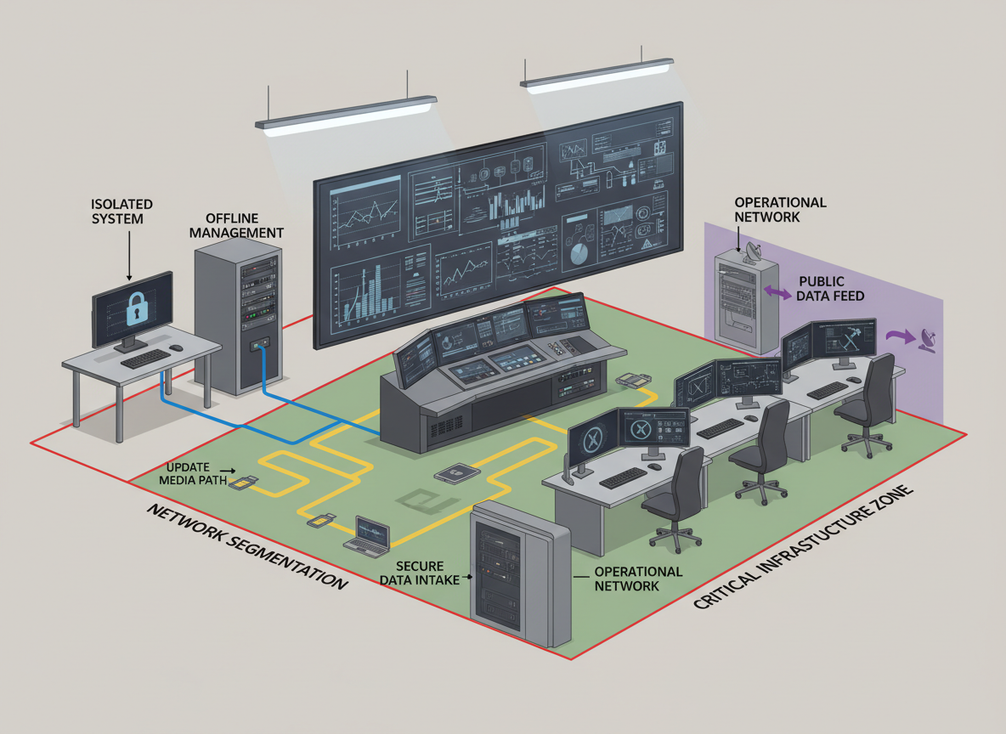
Network isolation is one of the biggest differences between a display that looks secure and one that is actually designed for sensitive use. The phrase cybersecurity design for control systems matters here because sensitive-facility guidance treats system design, control paths, and implementation details as part of the security review. In plain terms, the buyer needs to know where data can enter, where it can leave, and who can change that path.
An air-gapped command center display should be treated as an architecture to verify, not a marketing phrase to accept. Physical isolation is not the same as segmentation. A segmented network may reduce exposure, but it still leaves a logical path. If the wall controller, processors, and management workstation are not actually isolated, then "air-gapped" is the wrong label.
A good procurement question is: what exactly is isolated, and what still connects? Ask for architecture diagrams and operating procedures that show the management path, update path, and service path. If the answer relies on convenience features, shared tools, or a laptop that "only connects during maintenance," that is a sign to slow down.
Firmware is the other common risk point. Update controls should cover authentication, transfer path, approval, rollback, and service access. In practice, that means the buyer should know who signs the update, how files move onto the system, whether USB media or a maintenance laptop is required, and how the wall recovers if an update fails. A good wall can still become a weak system if updates are handled casually.
Watch for hidden paths that reopen exposure. Wireless adapters, remote desktop tools, maintenance ports, and shared management networks can undo a careful isolation design. If the vendor cannot list enabled interfaces and default services, the buyer has not finished the network review.
Logging, Monitoring, and Data Handling
Operational security questions are often about what gets remembered. For a control-room LED wall, buyers should ask whether screen content is stored, cached, mirrored, or retained after use. That matters because a wall can display sensitive material without being the permanent source of it, yet copies or logs may still persist in nearby systems.
- What actions are logged when the wall changes source, layout, or preset?
- Who can view those logs, and can the security team export them?
- Does any content persist in caches, snapshots, or mirrored feeds after display?
- Are operator actions monitored separately from content workflows?
- What is the incident-response process if unauthorized changes appear?
The difference between monitoring the wall and monitoring the people using it is easy to blur. Device monitoring tells you whether the system is healthy. User or content monitoring tells you who did what and whether sensitive material was exposed longer than intended. Those are not the same control.
If the wall sits in a sensitive environment, ask for a clear retention statement before purchase. You are trying to learn what survives after the meeting, shift change, or incident response period. If the vendor cannot explain that in plain language, the risk is not fully understood.
Vendor Evaluation Checklist
Use the checklist below in an RFP, demo, or security review. The goal is to compare evidence, not promises.
- Ask for the role matrix. Who can operate, administer, service, and approve changes?
- Ask for network diagrams. What is isolated, what is segmented, and what remains connected?
- Ask for the update workflow. How are firmware files authenticated, transferred, approved, and rolled back?
- Ask for logging details. What actions are tracked, who can review logs, and how long are they retained?
- Ask for service-access rules. How is remote support limited, approved, and removed?
- Ask for procurement screening. If federal rules apply, verify whether the Section 889 procurement restriction affects the source path, equipment mix, or service arrangement.
The best buying move is to score the evidence, not the sales pitch. If a vendor can answer each item in writing and match the answers to the actual architecture, the proposal deserves a deeper look. If the response stays vague, especially on access, update handling, or service paths, that is usually a sign to rule it out or ask for a tighter design before award.
For buyers comparing multiple vendors, the cleanest final step is to mark each response as documented, partially documented, or not documented. That makes it easier to separate a secure-looking demo from a reviewable system.
Final Takeaway
Government LED wall cybersecurity is really a question of system design, access control, and change control. If a command center wall can affect sources, operators, or service access, it should be reviewed like part of the room’s security boundary. The fastest way to reduce risk is to ask for written proof of RBAC, isolation, firmware handling, logging, and procurement screening before you compare price or features. When the answers stay vague, the safest move is to keep evaluating.
FAQs
How Secure Is a Control Room Display?
A control room display is only as secure as the system around it. Security depends on access control, network design, firmware handling, and logging, not on the panel alone. For procurement, the useful check is whether the vendor can document who can control it, how updates happen, and what data might persist after use.
What Is RBAC for Video Walls?
RBAC means role-based access control. In a video wall context, it separates operator, administrator, and service permissions so each user can only do the actions their job requires. Buyers should ask for a permissions matrix and for log details that show what changes are recorded.
Can a Command Center LED Wall Be Air-Gapped?
Sometimes an architecture can be physically isolated, but that claim has to be verified. Air-gapping is not the same as simple segmentation, and a vendor should show diagrams and procedures that prove where data flows begin and end. If support or updates still use shared paths, the setup is not a true air gap.
What Should Buyers Ask About Firmware Updates?
Ask how update files are authenticated, who approves them, how they are transferred, and what rollback or recovery option exists if something goes wrong. Also ask whether maintenance requires USB media, a service laptop, or remote access. Those details often reveal where hidden exposure enters the system.
What Documentation Should Be Requested Before Purchase?
Request the role matrix, network diagrams, update procedures, logging description, service-access rules, and any procurement screening documents that apply. For government buying, the safest approach is to review written evidence before demo enthusiasm. If a vendor cannot document a control, treat it as unfinished, not implied.





