





A commercial LED display warranty comparison should start with the contract, not the brochure. The key question is not just how long the warranty lasts, but what it covers, when it starts, who pays for labor or freight, and whether burn-in or image retention is treated as a separate risk. For command rooms and other 24/7 environments, those details can matter more than the headline term.

What Warranty Language Actually Covers
A longer warranty period does not automatically mean broader protection. For a commercial LED wall, buyers should compare scope first, then duration. The most useful documents are the warranty certificate, the service exhibit, the exclusion list, and the acceptance language that says when coverage begins.
Federal guidance for long-lived facility systems recommends looking for warranty terms that match the asset life, with a 10-year benchmark often used in government-style planning for LED systems from GSA guidance. That does not mean every commercial wall needs the same number, but it does show why duration alone is not enough.
Warranty Length Versus Warranty Scope
The practical comparison is simple: length tells you how long the promise lasts, while scope tells you what the promise actually includes. A buyer should check whether the coverage applies to cabinets, modules, power supplies, control electronics, and labor, because those items do not always travel together.
A good decision sentence here is: if the warranty is long but the scope is narrow, the deal may still be weak. That is especially true when the clock starts at shipment instead of installation or acceptance, because a delayed project can quietly shorten the usable coverage window.
Parts, Labor, and Return Paths
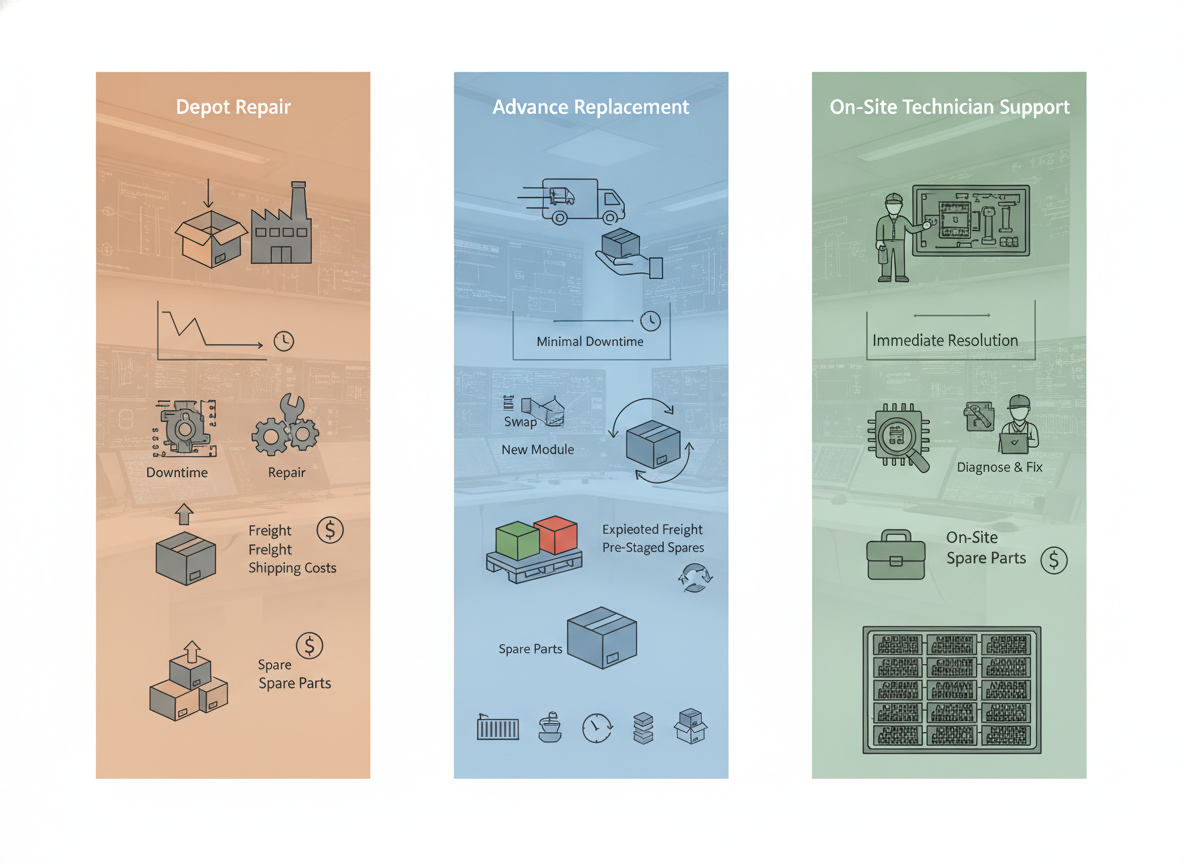
Parts coverage and labor coverage are not the same thing. Some quotes cover replacement components but leave the buyer responsible for removal, reinstall, travel, or freight. Others push the repair process into a depot or return-to-base flow, which adds shipping delay and creates more downtime risk.
That service path matters most in command centers and other rooms that cannot sit idle. In those environments, the better question is not, "Is the warranty long?" but, "What happens when a module fails on a live wall?"
How Commercial Terms Differ From Consumer Claims
Commercial display contracts often look broader than consumer terms, but the signed document is what counts. Consumer-grade screens commonly carry shorter terms and may exclude commercial or 24/7 use, while commercial warranties are usually written for heavier-duty applications as shown in a TCO comparison of commercial and consumer signage terms.
That difference changes the buying judgment. If the wall will run all day, every day, the buyer should assume the contract language will be more important than the marketing claim on the quote sheet. The signed warranty, not the brochure, is the part that decides a dispute.
Burn-In Coverage Needs Separate Review
Burn-in coverage in an LED display warranty deserves its own pass because it is not the same as ordinary defect coverage. Image retention, uneven wear, and visible pattern persistence can be treated differently from a dead module or failed power supply. In other words, a wall can be "under warranty" and still leave a buyer exposed to the exact problem they were worried about.
Burn-In, Image Retention, and Uneven Wear
Image retention is usually a temporary ghosting effect, while burn-in implies more permanent wear. That distinction matters because suppliers may treat those conditions differently in warranty language. For a buyer, the key question is whether visible retention or uneven wear is covered as a defect, handled as maintenance, or excluded as a normal operating characteristic.
A safe rule of thumb is this: if the supplier has to explain burn-in verbally, it is not reviewed enough yet. Ask for the written clause that says whether the issue is covered, limited by operating conditions, or excluded entirely.
Why Control Rooms Need Stricter Language
Static dashboards, maps, and status screens make burn-in review more important in command and control rooms than in casual presentation spaces. The more static the content and the longer the runtime, the more you need written clarity on duty cycle, calibration, and brightness assumptions.
That does not mean every control room wall will burn in. It does mean the buyer should treat burn-in as a separate contract question, especially when the room runs 24/7 or keeps the same interface on screen for long periods.
Contract Questions to Ask Before Signing
Use the quote review to force written answers to a few concrete questions:
- Is burn-in or image retention covered as a defect, or excluded as wear?
- Do operating hours, duty cycle, or brightness limits change eligibility?
- Are calibration logs or maintenance records required to keep coverage valid?
- Does the supplier define uneven wear separately from standard panel failure?
If those answers only appear in sales email, they are not ready for procurement. Put them into the warranty certificate or service exhibit before award.
On-Site Service and Replacement Terms
On-site service is usually more valuable than depot support for mission-critical rooms because it reduces downtime and logistics burden. The right comparison is not only what gets repaired, but where the repair happens, who handles transport, and how much work stays with the buyer.
This is the point where a commercial LED wall service agreement becomes a real procurement issue, because federal and schedule-based buying often relies on the written contract set, not just a vendor’s standard commercial language. That is a useful reminder for enterprise buyers too: the service model in the signed paperwork controls the actual risk.
| Service model | Typical coverage pattern | Buyer risk | Clause to confirm |
|---|---|---|---|
| Depot or return-to-base | Buyer ships parts or modules back for repair | Higher downtime and more logistics | Who pays freight and how long the wall is offline |
| Advance replacement | Replacement part ships before or as the failed part returns | Lower downtime, but not always full labor coverage | Whether labor, freight, and calibration are included |
| On-site service | Technician travels to the site for repair | Best for critical rooms, but usually more expensive | Response path, after-hours rules, and travel cost responsibility |
| Parts-only support | Supplier sends parts, buyer handles the rest | Lowest service burden for the supplier | Removal, reinstall, and diagnostic responsibility |
For most procurement teams, the real trade-off is downtime versus cost. If the wall supports operations, the better service model is usually the one that reduces recovery time, even if the headline warranty term looks shorter.
What to Confirm in Writing
Ask whether the warranty covers freight, travel, removal, reinstall, and field diagnostics. Those are common places where the real project cost appears later. Also confirm the escalation path and spare-parts access, because a fast repair promise is not very useful if the parts sit behind an unclear approval chain.
The practical test is easy: if the wall fails on a Friday night, what happens on Monday morning? The answer should be written down before purchase.
Common Exclusions That Shift Project Cost
The biggest hidden cost drivers are exclusions, not the headline warranty term. A quote can look generous and still leave the buyer paying for the expensive part of the repair.
- Misuse or unauthorized repair can void coverage, so buyers should know who is allowed to open the wall.
- Environmental conditions, power issues, and installation quality can affect whether a claim is honored.
- Cosmetic issues, consumables, and site damage may be excluded or defined narrowly.
- Freight, labor, and field diagnostics can remain unpaid even when parts are covered.
That is why a commercial LED wall warranty comparison should not stop at "how many years." It should ask what conditions the supplier uses to deny a claim, because those are often the conditions that show up first in real use.

How to Compare Vendor Quotes
Use the same review order on every quote so you can compare terms, not just prices. Start with warranty scope, then burn-in language, then service model, then exclusions, and finally the escalation path.
- Request the warranty certificate, service exhibit, and exclusion list.
- Check when coverage starts and whether acceptance changes the start date.
- Separate parts, labor, freight, and reinstall responsibility.
- Review burn-in, image retention, and uneven wear as a separate line item.
- Compare depot, advance replacement, and on-site service by downtime risk, not by marketing label.
- Ask the supplier to rewrite vague promises in the contract before award.
Federal procurement guidance reminds buyers that contract terms and pre-negotiated agreements can control the actual obligation set under FAR 8.402. For commercial buyers, the same habit helps prevent brochure language from outranking the signed paperwork.
A useful decision sentence is this: if a vendor will not put the clause in writing, do not treat it as part of the offer.
Final Takeaway
A strong commercial LED wall warranty comparison starts with scope, then checks burn-in coverage, service model, and exclusions. The best-looking quote is not always the safest one if it leaves freight, labor, or image-retention risk on the buyer. For command rooms and other high-uptime spaces, ask for the documents, compare the clauses, and make the supplier state the repair path in writing before you sign. If the terms are still vague, the risk is probably not priced correctly.
FAQs
What Is Normal for an LED Wall Warranty?
There is no single normal term that fits every project. For quote review, compare the warranty’s scope, start date, and service path first, then judge whether the duration fits the deployment. Government-style planning often looks for longer coverage on long-lived assets, but commercial projects still need the contract terms to match the use case.
How Is Burn-In Coverage Usually Handled in Commercial LED Wall Contracts?
Burn-in or image retention may be excluded, limited by operating conditions, or covered only under specific maintenance requirements. That is why it should be reviewed separately from ordinary hardware defects. The safest approach is to get the exact wording in the warranty certificate or service exhibit before award.
What Should On-Site Service Terms Include?
They should spell out who responds, what gets repaired on site, whether spare parts are available, and who pays freight, travel, or reinstall costs if they are still relevant. For mission-critical rooms, response path matters more than a headline warranty term because downtime is the real cost driver.
Why Do Commercial LED Wall Warranties Differ From Consumer-Grade Claims?
Commercial agreements usually rely on contract language, service exhibits, and written exclusions, while consumer-style marketing can sound broader than the signed obligation. Consumer displays may also exclude commercial or 24/7 use. That is why buyers should compare the actual documents, not just the spec sheet.
Can Buyers Negotiate Better Warranty and Service Terms Before Purchase?
Yes. Buyers can often ask for clearer burn-in language, stronger parts-and-labor coverage, explicit freight and reinstall responsibility, and a more useful service model. The best time to negotiate is before award, when the supplier still has room to put the promise into the contract.





