





A church LED wall budget starts before any product is priced. It starts when the church defines what the screen must do, where it will be installed and how it will be operated after handover.
Those decisions turn a general request for “an LED wall” into a real configuration. The configuration determines the cabinet grid. The cabinet grid then allows the supplier, integrator and local contractors to define the processing, structure, electrical work, logistics, installation and support required around it.
This guide follows that sequence from the first project conversation to a complete quotation.
Begin With the Church’s Normal Use
Before discussing screen width or pixel pitch, describe one normal service.
The wall may show lyrics, scripture, sermon slides, video and IMAG. These are not interchangeable requirements. Large lyrics viewed from the seating area create a different screen brief from detailed bilingual text or a live camera image behind the speaker.
Ask the production team to identify the moment when the existing display is least effective:
- Lyrics become difficult to read when stage lighting is on.
- People in side seats cannot see the content clearly.
- The camera shows visible pixel structure or distracting patterns behind the speaker.
- Daylight changes the appearance of the image during morning services.
- The stage must be rebuilt for youth events, conferences or community programmes.
The answer tells the project team what the LED wall budget must solve. It also prevents the screen from being specified around vague goals such as “better image quality” or “a larger visual impact”.
At the end of this step, the church should be able to state the wall’s primary job in one sentence. For example:
The main LED wall must keep lyrics readable across the seating area and support medium and close IMAG shots during weekly services.
That sentence will guide every later budget decision.
Turn the Use Case Into Screen Size and Pixel Pitch
Choose the active dimensions from content and sightlines
The available stage wall is not automatically the required LED wall size. Test representative content on the proposed canvas and review it from the nearest, central, side and farthest seating positions.
If a 6-metre-wide wall is proposed only because 6 metres of stage wall are available, ask the designer to show the same lyrics, scripture and IMAG layout on a narrower option. The supplier can then convert both options into actual cabinet grids. The church can compare two defined configurations rather than assuming that filling the wall is necessary.
The correct dimensions should also work with camera composition. A wall may be large enough for the audience but awkward when a camera frames a speaker against only part of the canvas.
Use pixel density where viewers and cameras can benefit
Pixel pitch changes the number of pixels available within the same active width. Consider a 6-metre-wide wall as an illustrative calculation:
Approximate horizontal pixel count = active width in millimetres ÷ pixel pitch in millimetres
- At P3.9, the wall provides approximately 1,538 horizontal pixels.
- At P1.25, the wall provides approximately 4,800 horizontal pixels.
If the wall is mainly a scenic background viewed from farther away, the additional density of P1.25 may not create a meaningful improvement from normal audience positions. If front-row viewers are close, small text is important or cameras regularly take close shots against the screen, a finer pitch may provide visible value.
This calculation does not select the pitch by itself. Ask the integrator to demonstrate the shortlisted options with the church’s normal content, camera positions, lenses, shutter settings and stage lighting. The chosen pitch should solve the real viewing and camera requirement, not simply carry the smallest number.
At the end of this step, the brief should contain proposed active dimensions, nearest viewer position, normal camera positions and the pitch options that require demonstration.
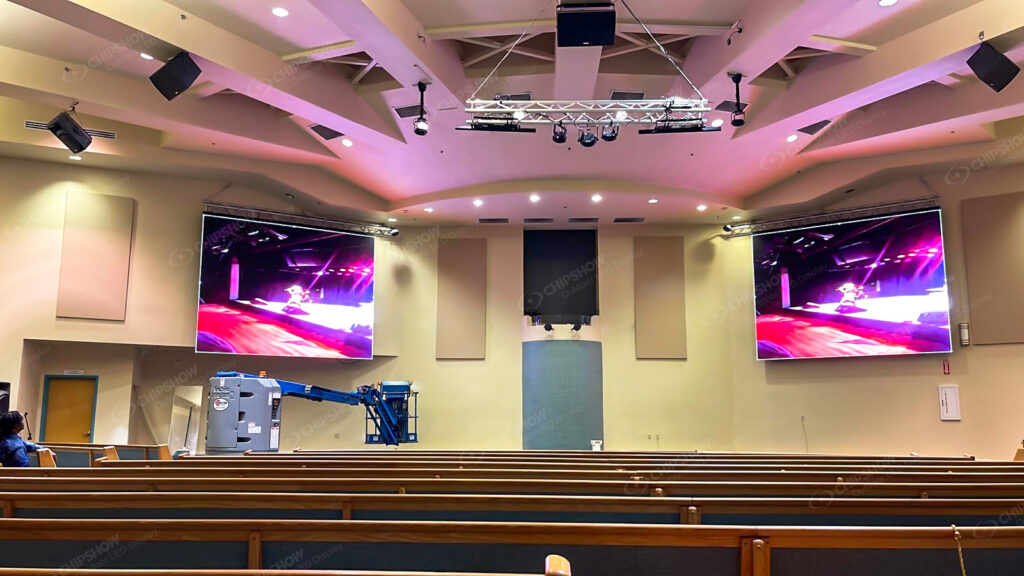
Choose the Installation Route
The same screen dimensions can lead to different project budgets depending on whether the wall is fixed, integrated into the architecture or rebuilt for different events.
Fixed wall for weekly worship and camera use
A fixed wall is the natural route when the stage remains stable and the screen serves the same room every week. The project team must decide whether routine service is available from the rear or must be completed from the front.
If there is no rear corridor, remove configurations that require routine rear access before the mounting structure is designed. The budget must then include a front-serviceable display route, suitable fixing and safe front working access.
For a close-view fixed wall, C-Max Fine-Pitch COB can be evaluated after the pitch requirement is demonstrated. Its 4:3 cabinet format supports a conventional 16:9 canvas, its components are front accessible, and its cable-free, board-to-board architecture supports a clean fixed installation. The listed 4H surface may also be relevant where people or movable equipment approach the screen.
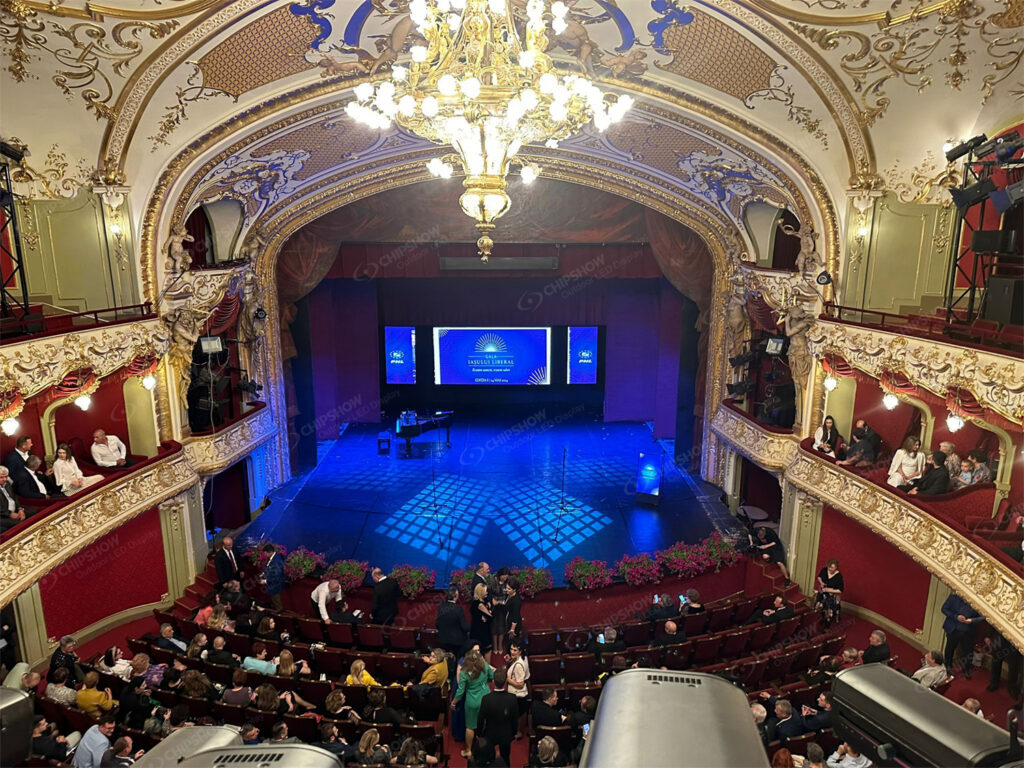
Architectural route for a traditional sanctuary
In a traditional interior, the screen remains part of the room when it is switched off. Compare a smaller central screen, two side screens and an integrated central wall before choosing the display surface.
Each route changes the project. Side screens require two installation and signal positions. A smaller central screen preserves more of the interior but must still keep text readable. An integrated wall makes its inactive appearance, fixing, ventilation and maintenance part of the architectural brief.
If the church selects the integrated route and does not want a conventional black surface, C-Max-Wall can be evaluated for its custom-textured finish. Review a physical sample, pattern continuity and maintenance access in the actual room before including that route in the final configuration.
Reconfigurable route for a changing hall
A rental-style system becomes relevant when the stage genuinely changes on a regular basis. Its budget includes more than flexible cabinets. The church also needs suitable supporting structure, storage, handling procedures, trained crew, inspection routines and saved configurations.
If the wall moves only occasionally, compare that operating requirement with a permanent wall before selecting a reconfigurable platform.
C-Rock Indoor can be evaluated where quiet operation, front/rear service and curved configurations match the programme. C-Shine Plus Indoor becomes more relevant where supported high-refresh configurations, quick module service and 90-degree or curved layouts are required. The product choice should follow the layouts and workflow the church has actually defined.
At the end of this step, the project has a selected route: fixed, architectural or reconfigurable, together with its mounting, service and operating assumptions.
Convert the Screen Into a Confirmed Cabinet Grid
Active width and height do not yet tell the church how many cabinets are required. LED walls are assembled from defined cabinet dimensions, so the proposed screen must be converted into a horizontal-by-vertical cabinet grid.
The supplier should state:
- exact product and pixel pitch;
- cabinet dimensions;
- horizontal and vertical cabinet count;
- total cabinet quantity;
- final active width and height;
- total resolution;
- spare quantity;
- any difference between the requested dimensions and the achievable cabinet grid.
This is the point at which a product quotation becomes usable. Without the grid, a price per cabinet cannot tell the church how many cabinets form the screen. A price per square metre can also hide the fact that the final wall must follow real cabinet increments.
Ask the supplier to place representative lyrics, scripture and IMAG on the resulting pixel canvas. That confirms that the physical grid and the content plan describe the same screen.
Add the System, Structure and Installation Scope
The cabinet grid defines the display, but the project budget is not complete until the wall can receive a signal, stand safely in the room and be installed at the site.
Processing and signal path
The quotation should explain how the church’s presentation computer, switcher and cameras connect to the LED processor and display. It should name the processor, relevant inputs and outputs, configuration owner and any required signal conversion or distribution.
Mounting structure and service access
Define whether the wall is fixed to a building surface, supported independently, hanging or ground-supported. Name the party responsible for design, supply, fixing and installation. Confirm that the service route chosen earlier still works with the final structure.
Electrical and data work
Record the available site infrastructure and the party responsible for final power distribution, data routes and related local work. Do not assume these items are included because the LED equipment has been quoted.
Freight and movement inside the building
Separate delivery to the site from unloading and internal movement to the stage. Doorways, corridors, stairs, lifts and working-hour restrictions may affect how the equipment reaches the installation point.
Installation and configuration
State who assembles and aligns the cabinets, connects the system, configures the processor and prepares the wall for testing. If different companies own these tasks, the handoff between them must be written into the project scope.
At the end of this step, every item required to deliver and install the configured wall should have a named owner.
Add Commissioning, Training, Spares and Maintenance
The project is not complete when the screen first turns on. The church needs an agreed method for accepting, operating and supporting it.
Commissioning should use the content and operating conditions defined at the beginning of the project. Test lyrics and scripture from representative seating positions. If cameras are involved, test the normal camera positions, lenses, shutter settings and stage lighting with a speaker framed against the wall.
The handover scope should identify:
- who receives operator training;
- which normal operating tasks are covered;
- where the final equipment schedule and configuration backup are stored;
- which spare components are supplied;
- how routine components are accessed;
- the first support contact and escalation route.
For a reconfigurable system, also define who can assemble, inspect and restore each approved layout. For a fixed wall, demonstrate the planned service access after the surrounding finish and structure are complete.
These items belong in the initial project budget because they determine how the church will use the wall after installation.
Request a Complete Project Quotation
The church can now send a brief based on confirmed decisions rather than a target screen size alone.
Include:
- the wall’s primary job and normal content;
- stage photographs and drawings;
- proposed active dimensions and pitch options;
- nearest audience and camera positions;
- fixed, architectural or reconfigurable route;
- cabinet-grid requirements;
- existing presentation, switching and camera equipment;
- mounting, service, power, data and delivery conditions;
- expected processing, installation and commissioning scope;
- training, spares, documentation and support requirements;
- project location and schedule.
Ask each bidder to return the exact configuration, inclusions, exclusions and scope owner for every project stage. Two quotations can then be compared in the same order used to build the budget:
| Project stage | What to compare |
|---|---|
| Use and visual requirement | Does the proposal solve the defined audience and camera problem? |
| Screen configuration | Are active dimensions, pitch, cabinet grid and resolution clear? |
| Installation route | Is the fixed, architectural or reconfigurable workflow fully defined? |
| Complete system | Are processing, signal, structure, electrical and data responsibilities included or assigned? |
| Logistics and installation | Are freight, unloading, internal movement, assembly and configuration clear? |
| Handover | Are commissioning, training, spares, backups and support defined? |
The final project quotation is not one unexplained total. It is the priced result of the decisions made at each stage of the project.
Build the Budget in the Same Order as the Wall
A clear church LED wall budget follows the way the system is created:
use case → screen dimensions and pitch → installation route → cabinet grid → complete system and site work → commissioning and handover → project quotation
Following this order helps the church understand why each item is present and prevents important project work from remaining outside the first quotation.
Once the requirements and responsibilities are defined, Chipshow team can help translate them into a product configuration for the church’s integrator or project team to evaluate.
Frequently Asked Questions
Q1: What information is needed before requesting a church LED wall quote?
Define the wall’s use, proposed active dimensions, audience and camera positions, installation route, service access, existing AV system, site conditions and expected supplier or integrator scope.
Q2: Why must the cabinet grid be confirmed?
The requested dimensions must be built from real cabinet increments. The grid determines the final active dimensions, cabinet quantity and resolution used in the quotation.
Q3: How should a church choose pixel pitch?
Compare shortlisted pitches using representative content, normal viewing positions and the church’s camera and lighting workflow. Choose the option that solves the visible requirement in the actual room.
Q4: What is included beyond the LED cabinets?
Depending on the project scope, the complete system may include processing, signal distribution, structure, electrical and data work, freight, installation, commissioning, training, spares and support. Confirm every inclusion and exclusion in writing.





