





For 24/7 command center LED wall spare parts planning, the safest starting point is simple: stock for the failures that stop the visible wall or power path, and write SLAs that separate response, diagnosis, part dispatch, and return-to-service. That keeps the plan tied to recovery, not just to contract language. For teams managing LED wall maintenance, that means planning around uptime first, not convenience.

Start With the Failure Modes That Cause Downtime
The parts you stock should match the failures that actually take the wall offline. In practice, the most urgent issues are module defects, PSU failures, and signal path interruptions, because those are the failures most likely to affect the visible wall or the power path at once module defects and signal interruptions. If a fault only affects a cosmetic detail, it is usually a lower stocking priority than a fault that blanks a section of the wall.
Common Failure Modes to Prioritize
For a command center, module-level failures matter because they can create a visible gap or a degraded image fast. PSU failures matter because they can remove power from more than one cabinet or row. Signal issues matter because they can look like a display problem even when the fault is upstream. The practical rule is to rank faults by how quickly they interrupt monitoring, not by how technical they sound.
A good decision sentence is this: if a failure can take a live wall partially or fully dark, it belongs near the top of the spares list; if it only slows a minor visual correction, it can usually stay lower priority.
Which Parts Should Be Prepositioned
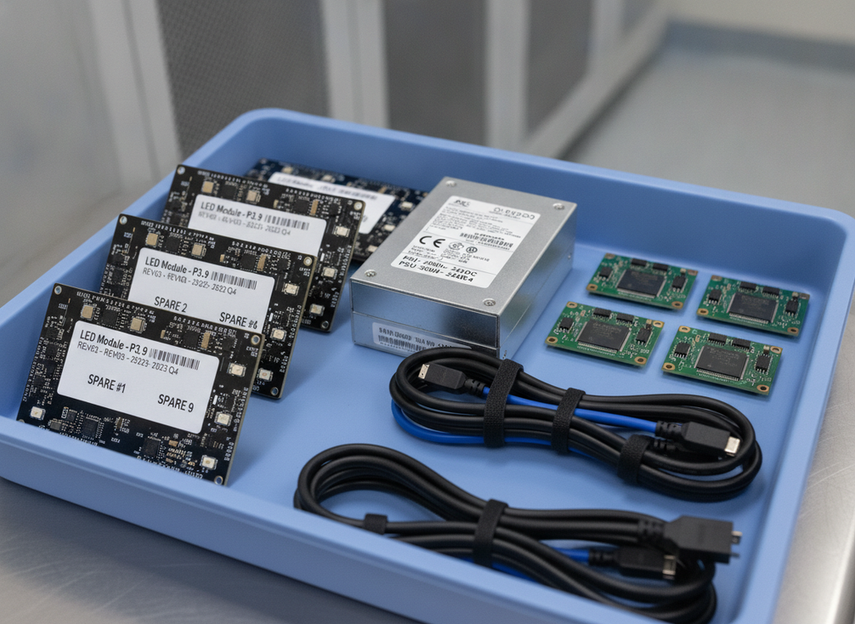
A mission-critical spare parts kit usually starts with the pieces that restore display or power first, not the pieces that are easiest to order later. That usually means modules, redundant power supplies, receiving cards, and the cables or connectors that commonly fail during a swap critical spare parts kit. Batch-matching or color-consistency checks also matter after repair, because a replacement part that technically works can still leave a visible mismatch.
The 2% to 5% module stock range is best treated as a planning heuristic for mission-critical walls, not a universal rule. It is more useful when the wall is large, the lead time is long, or the room cannot absorb a long outage. Smaller walls or sites with very fast vendor support may need less on hand, while remote sites may need more.
What Front-Service Design Changes
Front-service access does not remove the need for spares, but it can shorten the recovery path. A front-service cabinet is easier to reach, which can reduce how much equipment has to be moved and how many people have to be involved. In ideal conditions, that can make a module swap very fast, but the real timing still depends on the cabinet design, the right tool set, and whether the spare is already on site.
That is why front-service should be read as an uptime enabler, not a guarantee. If the wall is rear-service, deeply recessed, or difficult to access after hours, the same fault can take longer to clear even when the spare part is available.
How Preventive Maintenance Reduces Repeat Failures
Preventive maintenance should be tied to the same failure modes that drive stocking decisions. Thermal inspections, connector tightening, and pixel-level calibration checks help catch intermittent faults before they become hard failures preventive maintenance checks. For high-duty sites, quarterly or semi-annual review is a reasonable planning example, especially when the wall runs around the clock.
A simple filter helps here: if a task does not reduce a known failure mode or improve recovery speed, it is probably not the first maintenance task to prioritize. That keeps the checklist focused on uptime instead of turning into a long general-service routine.
Build a Spare-Parts Inventory for Uptime
A workable inventory plan sorts parts by criticality, then by how fast you can get a replacement into the room. The goal is not to own every possible spare. The goal is to keep the parts closest that are most likely to restore the wall, while using nearby warehouse or vendor-managed stock for less urgent items.
The table below shows a conservative planning structure for LED wall spare parts planning.
| Spare Part / Item | Failure Impact | Stocking Priority | Suggested Location | Reorder Trigger | Planning Note |
|---|---|---|---|---|---|
| LED modules | High, can create visible gaps or full-section loss | Highest | On-site first | Any use from critical reserve | Match batch and color closely after repair |
| Power supplies | High, can drop power to a cabinet or section | Highest | On-site or very nearby | Any failed unit or trend of repeated faults | Keep the replacement path short |
| Receiving cards | High for signal recovery | High | On-site or nearby | After a fault or when spares fall below target | Verify model compatibility before the outage |
| Signal cables and connectors | Medium to high | High | On-site | Visible signal instability or damage | Cheap to keep close, expensive to miss |
| Control or sender components | Medium to high | Medium | Nearby or vendor-managed | After diagnosis shows upstream fault risk | Stock based on actual room architecture |
| Tools and access hardware | High for repair speed | Highest | On-site | Missing or damaged during audit | A missing tool can delay an otherwise simple swap |
A useful decision rule is to keep anything that can stop the wall, or stop the repair, closer to the site than anything that only improves convenience. In that sense, spare inventory is really uptime inventory.
The stocking split should also reflect wall size and lead time. A larger wall with more modules has more opportunities for a single-point failure, so it usually needs a deeper critical-reserve plan. A site with long replenishment lead times should not rely on shipping to save the day. A site with strong local support can lean more on nearby stock, but only if the support terms are documented.
A second decision sentence: if waiting for a shipment would leave operators without a usable wall during the next service window, that part should not be treated as a normal order-on-demand item.
Set SLA Expectations That Protect Operations
A useful SLA is not just a promise to show up. It is a recovery map. For command center LED walls, the SLA should separate on-site response, part availability, diagnosis, and return-to-service so everyone knows which clock is running response windows and MTTR. That is the difference between a vague support promise and a plan that helps during an outage.
Service Window Language That Stays Realistic
Write service windows around what the site can actually support. Business-hours support may be fine for lower-criticality rooms, but a 24/7 command center usually needs after-hours coverage and a clear escalation path. The wording should also show who can authorize work, who can release spares, and what happens if the issue starts outside normal business hours.
When this breaks down, it is usually because the contract assumes office-hour workflows while the wall is expected to run continuously. If the room never closes, the SLA should not read as if it does.
MTTR and Replacement Time Benchmarks
MTTR, or mean time to repair, is best used here as a planning benchmark, not a promise. It helps teams estimate how long recovery might take once the issue is identified, the spare is available, and access is cleared. In a front-service room, the swap step may be short under ideal conditions, but diagnosis, approval, and validation still add time.
Think of the recovery path in pieces: detect the fault, confirm the part, get access, replace the part, and verify that the wall is stable again. If any one of those steps is weak, the total recovery time gets longer even when the repair itself looks simple.
Escalation Paths for Critical Displays
The escalation path should match the operational impact of the wall. For a command center, that usually means a fast internal contact, a vendor contact, and a clear owner for part release. After-hours coverage should define who is reachable first, who can approve the swap, and who confirms the wall is back in service.
The practical filter is this: if the team has to search for the right contact during an outage, the escalation path is not finished yet. A short contact list is better than a long one that nobody can use under pressure.
What to Write Into a Command Center SLA
At minimum, the SLA should state the response window, part access terms, repair scope, validation after service, and the distinction between planned maintenance and emergency service. It should also say whether the vendor is responsible for diagnosis only, part supply only, or the full recovery chain. Those details matter more than a broad uptime slogan.
For LED wall spare parts planning, the best SLA is the one that matches the inventory plan. If the SLA expects rapid repair but the parts are kept off-site, the contract and the recovery path do not line up.

Measure Repair Readiness Before You Need It
A spare-parts plan only matters if it works during a real outage. The fastest way to test that is to walk the recovery path before you need it: confirm the stock, confirm access, confirm tools, and confirm the escalation chain. If one of those steps is missing, the plan is incomplete.
- Verify the critical spare count. Check that the modules, power supplies, receiving cards, and cables you expect to have on hand are actually in the room or in the agreed nearby location.
- Check access and tooling. Make sure the right ladders, suction tools, magnets, fasteners, and access hardware are available for the cabinet type.
- Confirm escalation contacts. List the on-call person, vendor contact, and approval owner in a place the operations team can reach fast.
- Time a replacement path. Use a live or dry-run test to see whether the site can recover inside the target window, then treat that result as a benchmark for the next SLA review.
- Update the plan after the incident. If a fault repeats, or if a part was harder to reach than expected, revise the spare list and the service terms.
This is also where the plan should tie back to the actual wall layout and hours of operation. A room with full-time monitoring and limited service windows needs a tighter recovery checklist than a room that can tolerate a longer repair window.
One useful rule: if the team cannot verify the stock, the access, and the contact chain in the same exercise, the site is not yet ready for an outage. That is the core of workable LED wall maintenance planning.
Final Takeaway
LED wall spare parts planning works best when it follows the recovery path, not the org chart. Stock for the failures that stop the wall, keep the critical parts close, and write SLAs that separate response, diagnosis, dispatch, and return-to-service. Then test the plan after every real incident so it stays tied to the room you actually run.
If you manage a 24/7 command center, use that structure as your next review pass. It will usually show whether you need more on-site spares, clearer escalation, or a tighter service window.
FAQs
What Spare Parts Should Be Stocked for a Video Wall?
Start with the parts that restore the visible wall or power path first: modules, power supplies, receiving cards, and the cables or connectors most likely to interrupt service. The right depth depends on wall size, lead time, and whether the site can tolerate waiting for shipment.
How Long Does It Take to Replace a Failed LED Module?
Replacement time depends on access, staffing, the fault location, and whether the correct spare is already on site. Front-service cabinets can reduce handling friction, but diagnosis and validation still take time, so treat any swap estimate as a planning benchmark rather than a guaranteed outcome.
How Many Spare LED Modules Should a 24/7 Command Center Keep?
There is no universal count that fits every room. Use panel count, uptime criticality, vendor lead time, and batch-matching needs to decide. A small critical reserve may be enough for a well-supported site, while a remote or long-lead-time site often needs more.
What Should a Command Center SLA Include for Display Repairs?
The most useful SLA terms are response window, part availability, diagnosis ownership, repair scope, and validation after service. It should also distinguish planned maintenance from emergency work and make clear who can approve part release after hours.
Can Preventive Maintenance Reduce Spare-Parts Usage?
It can reduce avoidable failures and help you reorder smarter, but it will not eliminate the need for critical spares. Use inspection, cleaning, connector checks, and calibration to reduce repeat faults, then update the inventory list when a new failure pattern appears.





