





LED wall ergonomics belongs in the core spec for 24/7 command centers because operator comfort affects attention, shift endurance, and retention. A wall can look excellent on paper and still feel tiring over a long watch. The right standard frame is ISO 11064 ergonomics for control rooms, not generic display marketing. For mission-critical spaces, the question is not whether the wall is bright enough once, but whether it stays usable hour after hour.
Why Comfort Matters in 24/7 Control Rooms
In always-on rooms, fatigue and eye strain are operational issues, not just comfort complaints. If operators have to work through glare, awkward sightlines, or uneven brightness, they may spend more effort simply viewing the wall. That extra effort matters when shifts are long and attention needs to stay steady.
ISO 11064 gives the clearest authority frame for control room ergonomics from HSE. It reminds spec writers that displays, workstation layout, lighting, and room conditions work together. In other words, LED wall ergonomics is a systems question. The wall is part of the answer, but it is never the whole answer.
The practical buying lesson is simple: if a display only wins on pixel pitch or peak brightness, it may still be a poor fit for a 24/7 room. The spec should also protect posture, viewing ease, and visual consistency. If those are missing, the room may look impressive and still wear operators down.
For command-center buyers, that is a procurement issue as much as a human-factors issue. Comfort affects how long people can work steadily, and steady work affects turnover pressure, retraining load, and the quality of daily operations. That is why the most useful LED wall operator comfort specification starts with the room and the people, not the brochure.
Which Display Factors Shape Operator Comfort?
The main comfort levers are brightness, uniformity, glare control, mounting geometry, and color temperature. The useful question is not which one sounds best in isolation, but which one changes the lived experience of a seated operator over a full shift. The right answer usually depends on ambient light, viewing distance, and how much the wall has to clear consoles and other equipment.
Brightness and Uniformity
For typical command-room lighting, about 500 nits in practical control-room guidance is often treated as a useful operating reference, not a universal rule. The reason is straightforward: brightness has to fit the room, and the room changes the experience. A wall that is too dim can feel muddy and hard to read. A wall that is too bright can increase visual stress, especially over long shifts.
Uniformity matters just as much as absolute output. If parts of the wall are noticeably different in brightness, the eye keeps adjusting as operators scan across it. That does not just affect image quality. It can also make the wall feel more tiring than a more even display with slightly lower peak output.
For spec writers, the decision rule is practical: compare real operating brightness and evenness in the intended room, not peak brightness alone. If two walls look similar in a vendor deck, the one with steadier behavior across the surface is often the safer comfort choice for long monitoring runs.
Glare Control and Surface Treatment
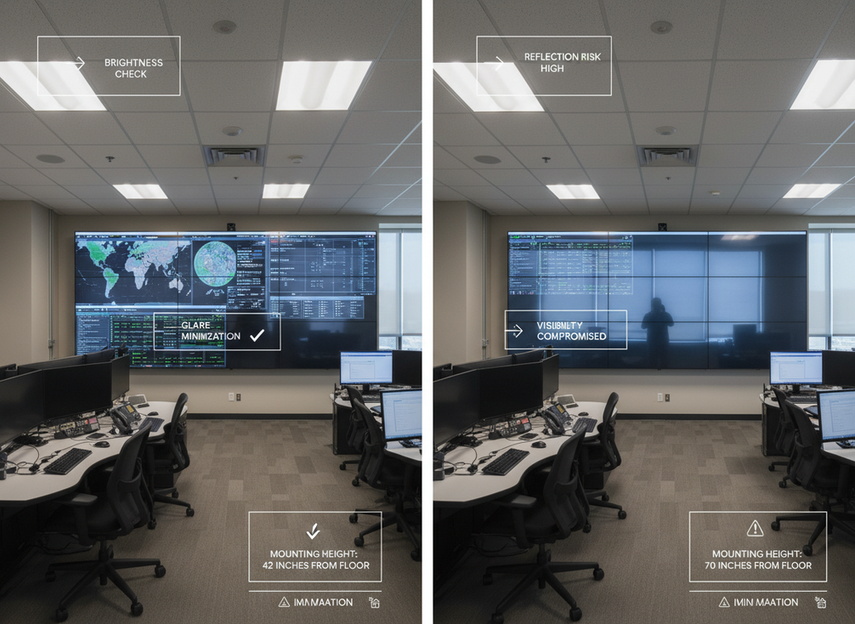
Anti-glare design can help, but only when it is judged in context. The glare reduction guidance for control-room finishes makes the key point that reflections come from the whole environment, not just the panel surface. Ceiling finish, wall finish, task lighting, daylight, and the wall’s own surface all shape what operators actually see.
That is why LED wall ergonomics cannot treat glare as a single product feature. A matte or low-reflectance surface may help, but it does not guarantee comfort if it sits under the wrong lighting or at the wrong angle. A room with strong reflections can still feel harsh even if the spec sheet says "anti-glare."
The buyer check here is to evaluate the wall in the actual room, or at least against realistic lighting assumptions. If glare is a concern, the question is not whether the wall has an anti-glare label. The question is whether the installed wall plus room surfaces keep reflected light from becoming a constant distraction.
Mounting Height and Viewing Angle
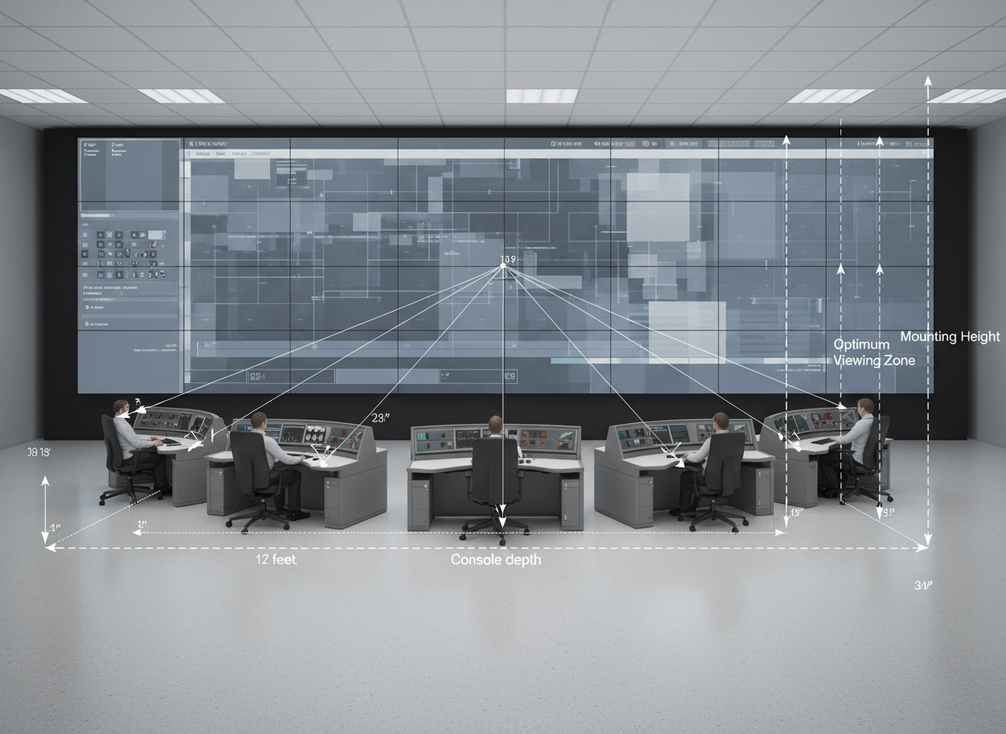
Mounting geometry changes how much head movement and neck tilt operators need. That is one reason the vertical viewing zone guidance for operators matters so much. Shared displays are easier to live with when the main visual area stays inside a constrained vertical band from the seated position.
A related planning reference is the 30-degree shared-display viewing limit. It is best read as a comfort and recognition boundary, not as a rigid promise. If operators have to look too far up, down, or off-axis, the wall becomes harder to read and more likely to cause posture compensation over time.
For retrofit work, a bottom edge around 48 inches is often treated as a practical starting point when the wall must clear console-mounted monitors. That is not a universal clearance rule. It is a useful screening point for rooms where seated sightlines and existing furniture constrain the layout.
The real check is simple: measure comfort from the operator chair, not from the floor plan. If the wall looks fine in CAD but forces extra chin lift or side-to-side head movement in the real seat, the geometry is wrong for a 24/7 room.
Color Temperature and Perceived Visual Load
Color temperature matters because it changes how the room feels during extended monitoring, even when image quality stays technically acceptable. In practice, the goal is to avoid a wall that feels discordant with the room lighting or too harsh for long sessions. That is a comfort and consistency issue, not a medical claim.
For LED wall ergonomics, the safest wording is conservative: choose a color tone that fits the room, the content type, and the shift pattern, then validate it in the actual environment. A cooler or warmer look may be preferable depending on the surrounding lighting and the operators’ visual tasks. What matters is not a universal "best" temperature, but whether the wall feels stable and workable across the shift.
When buyers over-focus on color temperature, they often miss bigger comfort problems like glare, uneven brightness, or poor mounting height. Those geometry and surface issues usually change the operator experience more than a small shift in tone.
How to Balance Comfort Against Visual Performance
The best wall is usually the one that balances comfort with the visual task, room layout, and maintenance reality. If a room is a new build, you may have room to tune the wall height and ambient light together. If it is a retrofit, the biggest gains usually come from the few changes that most improve sightlines and reflection control.
| Comfort factor | What to check | Why it matters in 24/7 rooms | Common mistake to avoid |
|---|---|---|---|
| Brightness management | Compare operating brightness in the actual room, not just peak output | Too little light makes reading harder; too much can feel tiring over time | Chasing the brightest spec without checking comfort in the room |
| Uniformity | Look for even brightness across the full wall surface | Uneven areas pull attention and increase visual effort | Treating uniformity as a minor picture-quality detail |
| Glare treatment | Review surface finish with the room’s lighting and reflective surfaces | Reflections can stay distracting after installation | Assuming an anti-glare label solves the room |
| Mounting geometry | Check seated sightlines, vertical band placement, and head movement | Poor geometry adds neck and eye strain | Setting height from drawings alone |
| Color temperature | Match the wall’s look to the room lighting and shift use | A mismatch can make the room feel harsher or less stable | Treating tone as the main comfort lever |
For comfort-versus-performance decisions, the flip point is usually room dependency. If the room already has fixed lighting and fixed consoles, prioritize geometry and glare control first. If the room can still be planned, tune brightness, viewing angle, and lighting together. That is usually the more durable choice for long-shift usability.
If you want a deeper procurement path after the comfort review, browse mission-critical display options or compare rugged COB command wall and fine-pitch COB display categories once the room checks are clear. Those pages are most useful after you know which geometry and comfort constraints matter most.
What to Check Before You Specify or Retrofit
Use the room, not the brochure, to screen the final choice. Before you lock the spec, check seated sightlines from the actual operator positions, not only from drawings. Then review ambient light, reflections from nearby surfaces, and whether the wall needs to clear consoles or other equipment.
A good vendor should be able to support the use case with room-fit guidance, installation diagrams, and model-specific documentation for any ergonomic claim. If a claim sounds strong but the evidence is generic, treat it as a cue to verify current specs before ordering. That is especially important when the room is a retrofit, because the geometry is less forgiving.
If you want a documentation trail for other deployment concerns, review the engineering and test documentation and a CB test report example as follow-up reading. Those are not proof of comfort, but they show the kind of evidence package buyers often ask for in serious procurement.
The short version is this: validate comfort in the actual room, request evidence for any ergonomic claim, and do not confuse a strong spec sheet with a comfortable command center.
Final Takeaway
LED wall ergonomics is about reducing friction in the room, not chasing a universal comfort number. For most 24/7 command centers, the safest approach is to check viewing geometry first, then operating brightness, then glare, then color tone. If those four pieces work together in the real room, the wall is far more likely to support long shifts well. If you are comparing options now, start with the room check and then narrow the display class that fits it best.
FAQs
How Do You Reduce Eye Strain From LED Walls?
Start with stable brightness, low glare, and seated viewing geometry that does not force extra head movement. Then confirm the wall feels comfortable under the room’s actual lighting. That gives you a better result than chasing a single "eye strain" feature on the spec sheet.
What Brightness Level Feels Comfortable in a Command Center?
There is no universal number. Comfort depends on ambient light, viewing distance, and how even the wall is across the surface. A practical operating reference in control-room guidance is about 500 nits, but it should be checked in the real room, not treated as a fixed rule.
Can Anti-Glare Treatments Help in 24/7 Control Rooms?
Yes, but only when the wall, the room surfaces, and the lighting are considered together. Anti-glare helps most when it reduces reflections under real operating conditions. If the room setup is poor, a surface label alone will not prevent visual distraction.
What Mounting Height Works Best for Operators?
The best height is the one that keeps the main viewing area inside a comfortable seated zone and avoids extra neck tilt. A bottom edge around 48 inches can be a useful starting point in some console-heavy rooms, but actual sightlines should decide the final height.
What Should Vendors Show for Ergonomic Claims?
Ask for room-fit guidance, installation diagrams, and model-specific evidence for any comfort claim. If the proof is only general marketing language, treat it as incomplete. For a 24/7 control room, the evidence should match the room and the use case.





