





Control room LED integration works best when you treat it as a workflow decision first and a hardware decision second. The right setup keeps operators responsive, preserves existing SCADA and KVM habits, and avoids creating a new single point of failure. For security rooms, the main question is not just whether the wall can display content, but whether the control path stays predictable when sources, users, or software versions change.
What a Control Room LED Integration Must Accomplish
Start with the room’s operating job, not the panel spec. A control room LED wall has to improve visibility, support fast handoff between operators, and fit the current stack without forcing a redesign of the room around one display. That matters most in command centers where SCADA, KVM, and security software already shape how people work.
The practical filter is simple: if the wall adds confusion, extra switching steps, or unclear ownership, it is not helping the room. The best control room LED integration usually separates source display, operator control, and recovery planning so each part can be tested on its own. Latency, handoff, and failover are therefore design constraints, not afterthoughts.
If a vendor says the wall is "compatible," the next question is which part of the stack is actually covered. Generic integration patterns can be shared across rooms, but platform-specific compatibility has to be checked against the real software, version, and control workflow.
Choose the Integration Architecture First
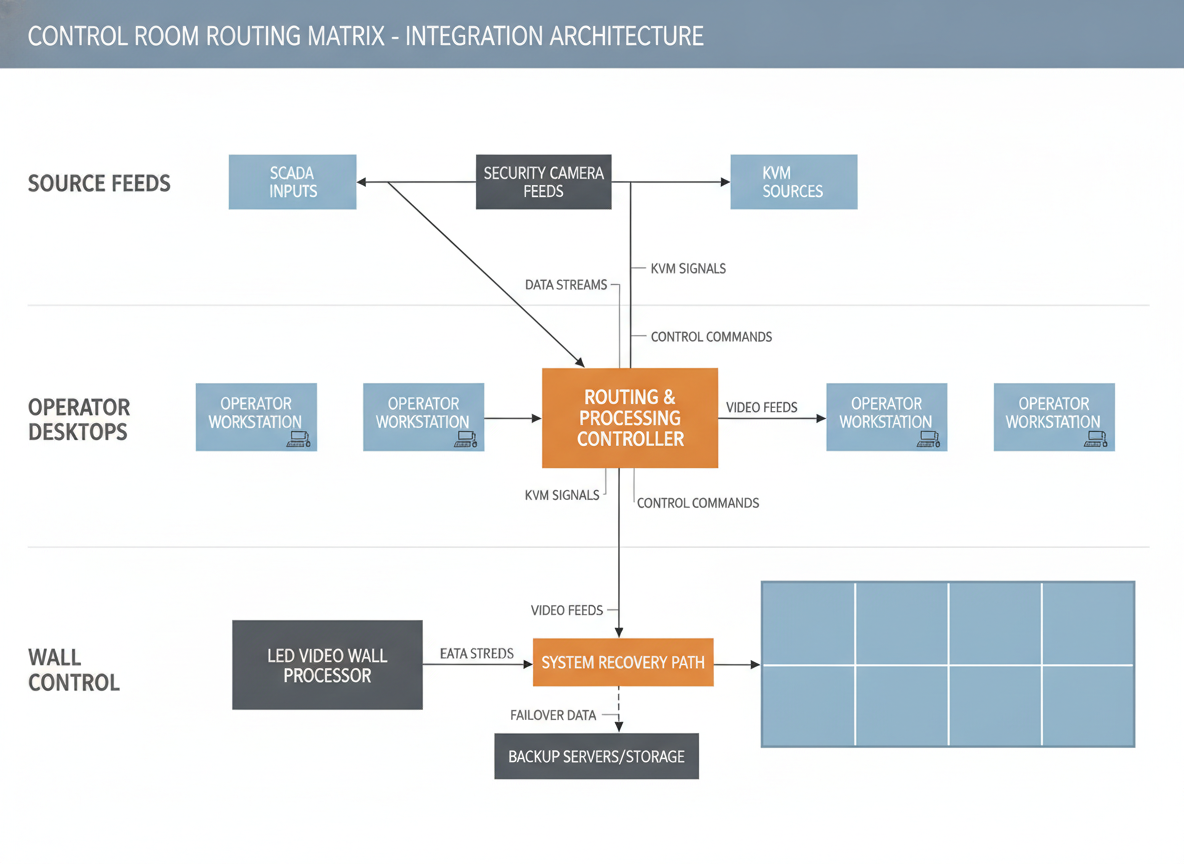
The architecture choice changes everything else. Direct source routing, centralized processing, and distributed signal distribution all solve the same problem in different ways, but they do not create the same control burden or failure exposure.
| Architecture | Best fit | Control path | Latency risk | Redundancy angle | When it gets harder |
|---|---|---|---|---|---|
| Direct source routing | Smaller rooms or fewer feeds | Short and easy to trace | Usually lower because there are fewer hops | Simple to document, but source protection still matters | When many sources or layout changes appear often |
| Centralized processing | Rooms that need many windows, presets, or coordinated layouts | One main control point for the wall | More layers can add risk if the chain becomes busy | Easier to manage from one place, but the controller becomes important | When the processor becomes a bottleneck or single point of failure |
| Distributed signal distribution | Larger or more resilient rooms | Control is spread across more devices | Can stay responsive if the routing stays disciplined | Better for separating critical paths, but it adds planning overhead | When the team cannot keep configuration and ownership clear |
For most control rooms, the better choice is the one that keeps the path shortest without sacrificing the control features the operators actually use. If the room needs many shared layouts, centralized processing may be worth the extra complexity. If the room is trying to reduce failure exposure, a distributed path can help, but only when the team can maintain it cleanly.
A useful rule is this: the more often the wall changes state during operations, the more important it becomes to keep the control path simple and obvious. If the design creates hard-to-explain behavior, troubleshooting gets slower and the room becomes harder to trust.
Map Sources, Control, and Operator Handoffs
A stable control room LED integration separates three things: source feeds, operator desktops, and wall control. That separation keeps switching predictable and prevents one operator action from affecting another team’s work.
For SCADA and security feeds, the display behavior may need different priorities, windowing, or alarm handling than an operator desktop does. For KVM, the main job is to let people use remote systems without forcing them to sit at every source machine. The key is to decide where the source is being managed and where the wall is only showing it.
ISA-101 is useful background for this kind of HMI discipline because it reinforces the idea that visual presentation should support operator readability and consistent alarm behavior rather than decorative layout changes. In practice, that means the wall should be built around the room’s workflow, not the other way around. ISA-101 HMI design guidance is a reasonable reference point when you are deciding how much visual change the room can tolerate.
Presets and permissions matter because they reduce accidental switching. If multiple teams share the wall, document who can change layouts, who can change sources, and which actions require escalation. That documentation should exist before commissioning, not after the first troubleshooting call.
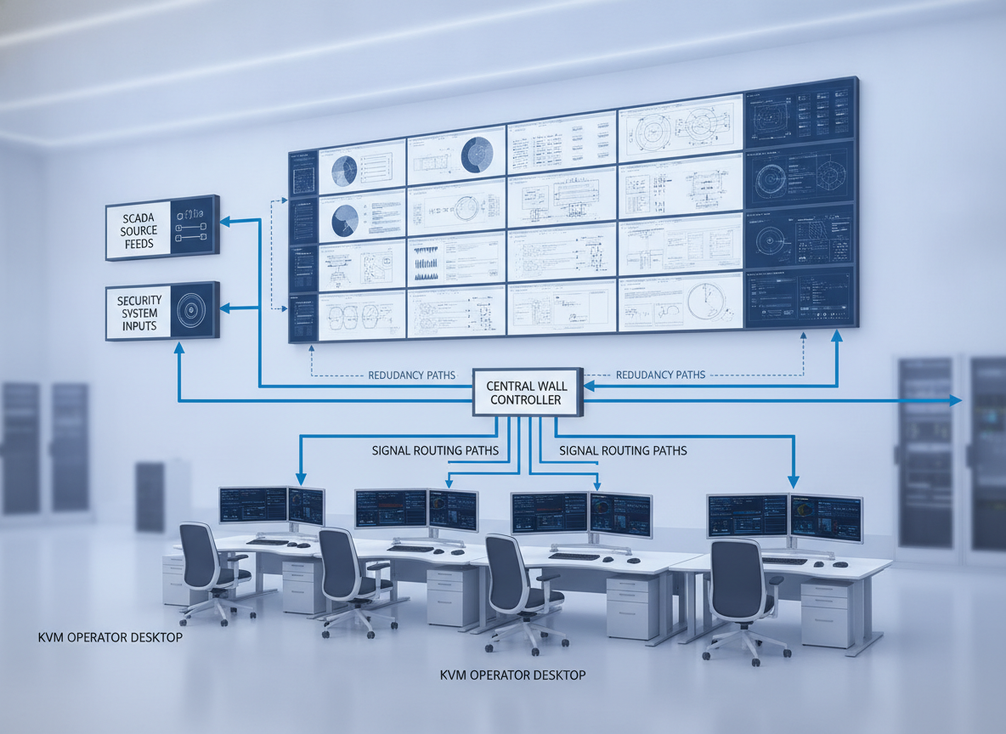
A practical handoff rule is: if an action changes the whole wall, it should be rare, named, and permissioned. If an action only changes one operator view, it should not disrupt the rest of the room. That is the difference between a predictable room and a fragile one.
Design for Low Latency and Stability
For control rooms, "low latency" means the wall responds quickly enough that operators do not feel a disconnect between the source event and the display update. The exact number depends on the room, but the buying decision is usually about avoiding unnecessary conversions, layered processing, and extra switching points.
Common places where delay creeps in include:
- extra format conversion between systems,
- overcomplicated switching chains,
- multiple software layers that all touch the same signal,
- and repeated handoffs between devices that do not need to be in the path.
A simpler signal path often improves troubleshooting clarity as much as responsiveness. That does not mean every room should be stripped to the bare minimum. It means you should only add processors, extenders, or software layers when they solve a specific operating problem that is more important than the added complexity.
Stability also depends on configuration discipline. Version control, named presets, and a known recovery procedure matter because a clean-looking system can still behave unpredictably if settings drift over time. If the room is going to be maintained by more than one team, the configuration should be documented as carefully as the cabling.
Build Redundancy Around the Critical Links
Redundancy should protect the links that would stop monitoring if they failed, not every component equally. That usually means deciding which failure would actually interrupt the room’s job, then protecting that path first.
-
Identify the critical links.
Ask which source, controller, network, or power path would stop operators from seeing what they need. Those are the places where redundancy matters most.
-
Match the redundancy layer to the failure mode.
Source redundancy protects against a feed loss. Controller redundancy protects against the main processing unit failing. Path redundancy helps when a link or route breaks, but it only works if the alternate path is also usable.
-
Test the recovery process.
A failover design is only useful if the operators and support team know what happens during the switchover. The room should not depend on memory or guesswork during an incident.
-
Document the result.
If recovery behavior changes after a reboot, source loss, or preset change, write that down before go-live. A tested weakness is easier to manage than an assumed strength.
The main trade-off is that more redundancy usually means more planning. That is normal in mission-critical rooms. The risk is not redundancy itself; the risk is building it without testing the exact failure mode you care about.
Verify Compatibility Before Commissioning
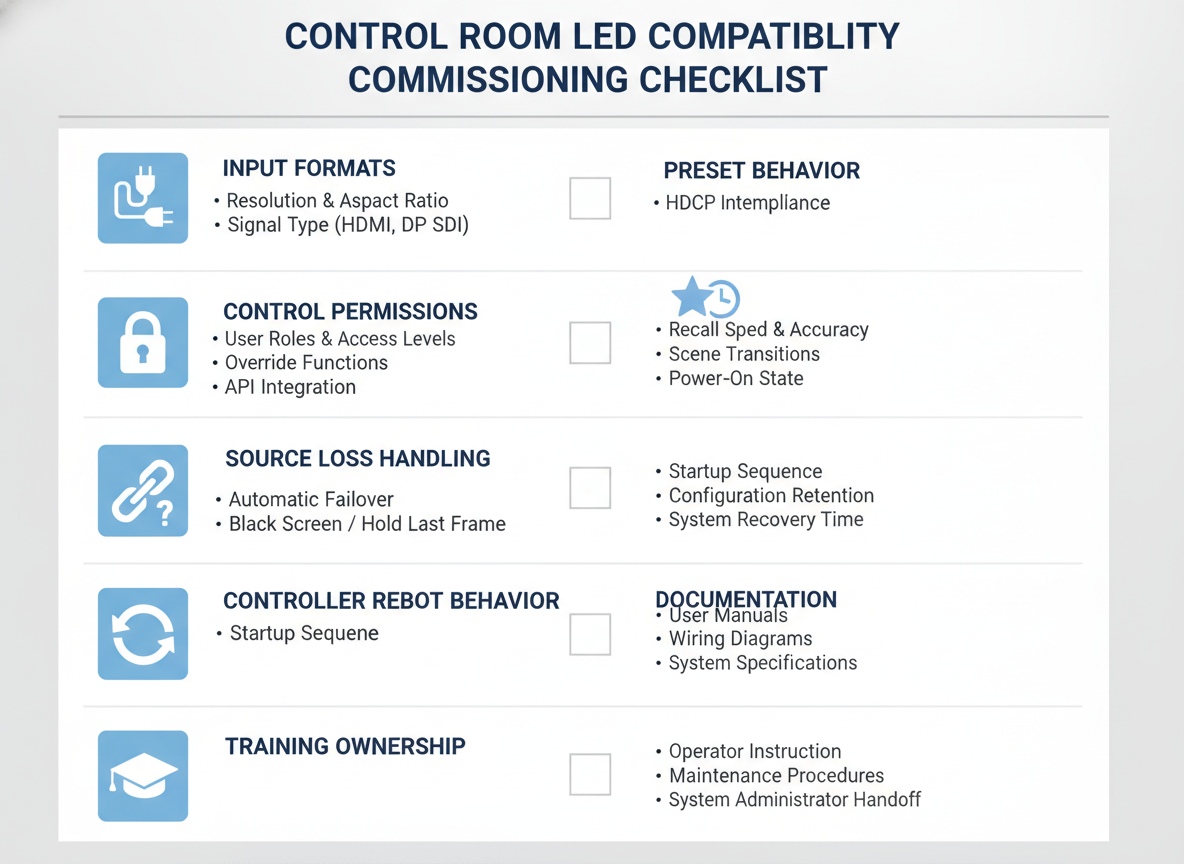
Compatibility should be checked as a commissioning task, not assumed from a brochure. Product sheets can tell you what a system claims to support, but they do not prove how the room behaves when SCADA, KVM, and security software all meet the same controller.
For a named example, Genetec Security Center video wall integration requires the Video Wall plugin on the Directory server and licensed Video Wall Unit entities. That is a concrete requirement for that platform, but it should not be treated as a proxy for every security stack.
Before go-live, check these items:
- signal formats and input expectations,
- software version and control permissions,
- preset behavior under routine switching,
- source-loss handling,
- controller reboot behavior,
- and whether the room’s documentation matches the actual workflow.
The most useful commissioning test is the one that recreates an operator’s real day. If the wall behaves differently when a source drops, a preset changes, or a support person logs in, that needs to be discovered before the room depends on it.
Control room compatibility checks can also be useful as a follow-up path when you need to review display-side engineering and support documentation alongside the integration plan.
Deployment Questions to Close Before Go-Live
Before the room goes live, the team should be able to answer four questions clearly: who owns the signal path, who owns the control path, what happens after a fault, and which sources are truly mission-critical. If any of those answers are vague, the integration is not finished.
Also confirm support ownership, spare-part readiness, and escalation paths. A wall that looks complete can still be hard to operate if nobody knows who is responsible when something breaks. For control room LED integration, the final check is not just whether the wall works today, but whether the room can keep working after the first real incident.
Final Takeaway
The safest control room LED integration is the one that fits the room’s workflow, keeps the signal path understandable, and protects the links that actually matter. Use architecture to reduce confusion, use presets and permissions to reduce operator error, and use commissioning tests to prove the system behaves the way the room expects. If a design is hard to explain, it will usually be hard to support. Start with the workflow, then verify the stack, then commission for the failure modes that matter most.
FAQs
How Do You Choose a Control Room LED Integration Architecture?
Start with the number of sources, how often operators need to switch layouts, and how much complexity the room can support. A simpler path is often easier to troubleshoot, while a more centralized design may be useful when the room needs coordinated presets or many windows. The right answer depends on workflow and uptime needs, not just display size.
What Should Be Verified Between SCADA, KVM, and the LED Wall?
Check signal formats, control permissions, operator handoff, preset behavior, and software version dependencies. Those are the points where a room can look compatible on paper but still behave unpredictably in practice. If the workflow changes during a source loss or operator switch, that should be found during commissioning.
Why Does a Simpler Signal Path Often Work Better in Command Centers?
Fewer conversions and fewer intermediate layers usually make troubleshooting easier and reduce the chance that the wall feels delayed or inconsistent. That does not mean every room should be minimal, but extra boxes should earn their place by solving a real operational problem. If they do not, they often add friction.
Can Redundancy Eliminate a Single Point of Failure in a Video Wall System?
It can reduce risk, but it does not remove the need to identify the critical link first. Redundancy only helps when the alternate path is actually usable and the failover process has been tested. A backup design that has never been exercised is still an assumption, not proof.
What Happens If the Control Room Uses a New Security or SCADA Platform Later?
Treat future platform changes as a retest event, not a small update. Version changes can affect interfaces, permissions, and workflow behavior, so the system should be rechecked whenever the stack changes. The safest plan is to document the interfaces now and verify them again before the new platform goes live.





