





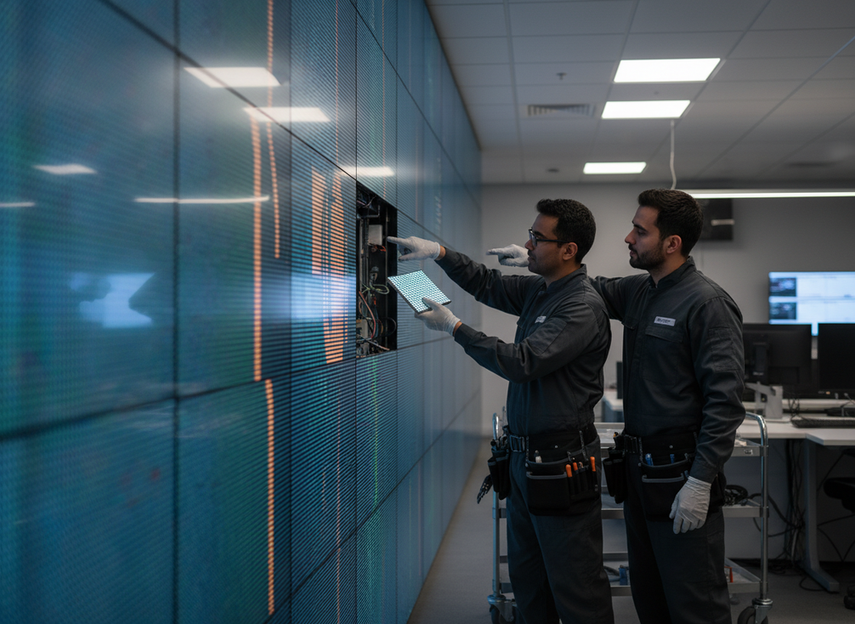
If you need COB module replacement steps for a live command center wall, the safest approach is a controlled repair plan that protects uptime, preserves image uniformity, and keeps operators informed. In a 24/7 room, the goal is not to promise zero interruption; it is to confirm the fault, replace only what is necessary, and verify the wall returns to service in a known-good state. For a COB LED wall, that planning starts before the first failure.
Why Replacement Workflow Matters in 24/7 Rooms
A failed module in a command center is not just a maintenance issue. It can interrupt monitoring, distract operators, and create pressure to improvise during a live shift. That is why serviceability belongs in the buying decision, not only in the repair notebook.
The practical workflow is simple to state and hard to execute well: diagnose, prep access, replace, verify, and restock spares. If the wall is used for mission-critical visibility, think about command center LED repair access before the first failure happens, not after.

If the room runs continuously, service access and spare planning matter as much as image quality, because a clean repair path reduces the chance of a second outage. If a wall looks strong on a spec sheet but is hard to reach or hard to verify after a swap, it is a weaker fit for 24/7 operations.
For buyers comparing mission-critical wall options, the right question is not just "How bright is it?" but "How will we recover when one module fails?" That is the real use case for a mission-critical wall options conversation. If your team is already planning around C-Pad command walls, service workflow should be part of that discussion from day one.
Confirm the Failure Before Opening the Wall
Start by confirming that the problem is truly module-level and not caused by signal, power, controller, or content issues. A dark tile, flicker, color shift, or a dead cluster can look like a COB failure, but the root cause may be upstream.
Use a short isolate-and-confirm sequence:

- Observe the symptom on the live wall and note the exact location.
- Compare the affected module with adjacent modules.
- Check whether the issue follows the module or stays with the signal path.
- Inspect power feed, cabling, and controller status.
- Decide whether replacement is warranted before opening the wall.
If the symptom changes with content or input source, investigate the control chain first. Some control topologies can keep the rest of the wall active during service, and the NovaLCT user manual shows how ring redundancy can help preserve operation while one section is being worked on. That does not eliminate risk, but it can narrow the outage.
A practical rule is simple: do not replace a COB module until you can isolate the fault to the panel or module assembly with reasonable confidence. Swapping hardware too early can add downtime instead of removing it.
Prepare Access, Tools, and Safety Controls
Preparation is where most avoidable delays are prevented. Before anyone opens a live COB wall, confirm access type, stage the replacement module, and make sure the room can tolerate the work window you are about to use.
The checklist below keeps the job narrow and controlled:
| Check | What To Look For | Who Usually Confirms It | If It Fails |
|---|---|---|---|
| Access path | Front-service or rear-service access is actually available | Technician or integrator | Delay the repair or change the approach |
| Spare match | Correct module family, pitch, and connection format | Operations or service lead | Do not open the wall yet |
| Tools | Site-approved tools and handling aids are staged | Technician | Retrieve the missing tool before starting |
| Work control | Roles and stop-work criteria are clear | Service lead | Pause until responsibilities are assigned |
| Safety window | The room can tolerate the planned intervention | Operations | Move to a maintenance window if needed |
For COB surfaces, COB removal tooling matters because the encapsulated resin surface is better handled with an electric vacuum suction tool and soft silicone nozzle than with a tool that can slip or scratch. That is a handling preference for this form factor, not a universal rule for every LED module.
For energized equipment, use the live electrical clearance and the site’s maintenance procedures as your safety baseline. In US facilities, that means you should treat the wall as live equipment until it is clearly isolated. If your process includes lockout or a permit step, follow it.
If you cannot confirm part compatibility before opening the wall, pause the job; a mismatched spare can create more downtime than the original defect. If the room cannot support safe access and clear communication, defer the repair to a maintenance window instead of forcing a risky live intervention.
Remove and Replace the Failed Module
Once the fault is isolated and the area is prepped, work one module at a time. The goal is a clean remove-and-install flow that keeps the rest of the wall stable.
Use a disciplined sequence:
- Isolate the target area and confirm the affected section is out of active use if needed.
- Note the module orientation before removal.
- Release or disconnect the module in the order specified by the wall design.
- Support the module evenly so neighboring tiles are not stressed.
- Place the removed part in a labeled, padded container.
- Inspect the opening and nearby tiles for dust, edge damage, or connector wear.
- Install the replacement in the exact same position and orientation.
- Secure the module fully before restoring power.
Mission-critical walls often use a loop-through signal topology, and the NovaLCT user manual shows how ring redundancy can feed the signal from the opposite direction so the rest of the wall can stay active during a module swap. That is useful, but it is conditional on the system design.
Keep the focus on process discipline, not speed claims. Gentle handling matters because the objective is to avoid bezel damage, cable strain, or alignment errors that turn one repair into two.
If the wall design supports sectional isolation, replace only the affected module and keep the intervention narrow unless the inspection shows a broader defect pattern. If the replacement exposes a second issue, stop and reset the plan instead of pushing through the swap and hoping verification will hide the problem.
Verify Image, Alignment, and Return to Service
Verification is the final control point before the wall goes back to operators. A replacement is not finished just because the part is seated and powered.
The table below shows the checks that matter most before handoff:
| Check | What To Look For | Who Confirms It | If It Fails |
|---|---|---|---|
| Module recognition | The controller sees the replacement correctly | Technician | Recheck seating and connection |
| Image uniformity | Brightness and color blend with neighbors | Service lead or operator | Adjust or investigate mismatch |
| Alignment | No visible step, gap, or seam issue | Technician | Reseat or inspect the cabinet opening |
| Controller status | Faults or alerts are cleared | Control room operator | Resolve the system message before signoff |
| Live-content behavior | The wall looks normal under real feeds | Operator and technician | Keep the repair open until stable |
After physical replacement, use post-swap color matching where the control system supports it. That kind of adjustment helps a new module blend into an older wall instead of standing out under live content.
If possible, test with both a diagnostic pattern and the normal command-center source. A module that looks fine on a test image can still show mismatch, banding, or seam visibility under real feeds. Record the result so the next service call starts with a baseline.
If the replacement passes a diagnostic test but still looks different during live operation, treat the job as incomplete until the mismatch is resolved.
Plan Spares, Access, and Escalation for the Next Failure
The easiest repair is the one you already planned for. Spare-module planning is an uptime strategy, not an afterthought.
A practical spare plan should cover:
- Enough spare depth for the room’s risk tolerance
- Matching by module family, pitch, and revision
- Clear labeling and storage discipline
- Rotation or aging checks for parts held on the shelf
- Access planning for front-service or rear-service conditions
- Escalation contacts for the integrator or vendor
Long-term spare support helps maintain visual consistency and service continuity as the wall ages. That is especially relevant when the original batch is no longer fresh in the field and replacement parts need to blend into an existing wall.
Documentation also matters. AV system labeling and records reduce ambiguity during fault isolation, and the AVIXA standards catalog is a useful background reference for why that discipline helps service teams move faster.
If your wall has a repeat issue in the same zone, treat it as a system signal rather than a one-off defect. Repeated replacement in one area can point to airflow imbalance, installation stress, or environmental exposure that needs a broader fix.
What to Check Before You Buy for Serviceability
When you compare COB walls for a 24/7 room, ask service questions before you fall in love with the image. Who can access the wall, how fast can the correct spare be identified, and what happens if the repair exposes a larger issue?
That is why serviceability should sit next to brightness, pitch, and resolution in the buying process. A wall that looks excellent but is difficult to open, verify, or restock will cost more to own in a live environment.
If you are reviewing a system now, ask for the exact repair workflow, the spare-part policy, the verification method, and the escalation path before you place the order. For Chipshow buyers, that is a good moment to compare C-Pad command wall options against your room’s access and uptime requirements, then decide whether the service model fits the operation.
FAQs
Can COB LED Module Replacement Steps Be Done During Live Operations?
Sometimes, but only when the wall design, access method, and site procedures support that level of work. Do not assume a live swap is safe or interruption-free unless the system is designed for sectional service and your room can tolerate it.
How Do You Tell Whether the Problem Is the COB Module or the Signal Path?
Check whether the defect stays in the same physical location or follows the signal, power, or controller path. If the symptom changes with input source or content, the issue may be upstream rather than in the module itself.
What Spare Module Strategy Works Best for 24/7 Control Rooms?
The best strategy is a small, clearly labeled spare set that matches the installed wall family and revision, plus a storage and rotation process. A spare is only useful if it can be identified, retrieved, and installed without guesswork.
What Is the Difference Between Front-Service and Rear-Service Repair Access?
Front-service access lets technicians reach the wall from the room side, which can reduce disruption when the back side is constrained. Rear-service access may be fine in rooms with clear maintenance space, but it becomes harder when the wall is built into a tight control-room layout.
How Should a Command Center Verify the Wall After Replacement?
Verify recognition, brightness, color consistency, alignment, and normal behavior under live content. A repair should not be signed off until the repaired section blends cleanly with the rest of the wall and no fault messages remain.
For 24/7 command center walls, the best result from COB module replacement steps is a controlled repair with clear boundaries, verified performance, and documented follow-up. Replace only the confirmed faulty module, check the result under real operating conditions, and escalate if the repair exposes a wider issue. We plan our service model around that process, not around promises the wall cannot keep.





