





If you need to know how to specify an NTCIP-compliant highway VMS, start by treating compliance as an interoperability and control requirement, not just a display feature. The safest RFP language names the applicable standard edition, the project’s acceptance basis, and the agency documents that will verify the system. That keeps the bid answerable and reduces the chance that the sign looks right but does not integrate the way your project needs.

What NTCIP Compliance Means for Highway VMS
For a highway variable message sign, NTCIP compliance means the sign can be controlled and monitored through the applicable NTCIP 1203 interface for dynamic message signs, including the object structure and MULTI message syntax defined in the standard. In plain terms, the agency is not just buying a cabinet and LEDs. It is specifying how the sign talks to the management station and how messages are handled in the field, as described in NTCIP 1203 v03.
That distinction matters because a spec that says only "NTCIP compliant" can leave too much room for interpretation. If the project expects a particular edition, a specific controller behavior, or agency-defined add-ons, write that into the RFP instead of assuming the bidder will fill in the blanks. In practice, how to specify an NTCIP-compliant highway VMS is really a question of defining the standard, the interfaces, and the proof the agency will accept.
Use this as your decision sentence: if the RFP cannot name the standard edition and the acceptance basis, it is too vague to support a clean bid. If the project also depends on agency-specific communications or scheduling rules, those belong in the spec as project requirements, not as assumed vendor defaults.
Which Standards and Guidance Belong in the Spec
The core technical reference should be NTCIP 1203, but that is only the starting point. FHWA’s model systems engineering documents for DMS projects show why the procurement package also needs the project’s needs, requirements, verification approach, and implementation assumptions. For public buyers, that means the RFP should read like a traceable procurement file, not a hardware brochure.
NTCIP 1203 as the Core Interface Standard
NTCIP 1203 is the base interface standard you verify for DMS and VMS control language. In the RFP, tie the sign controller and communications wording to the applicable edition instead of writing a generic "supports NTCIP" line. That keeps bidders from assuming different object sets or different message-handling behavior. It also helps the reviewer see whether the proposed system matches the agency’s operating model.
FHWA Systems Engineering Documents
FHWA’s systems-engineering guidance matters because it pushes the buyer to specify the project, not just the device. The practical takeaway is simple: if the procurement package does not describe requirements, verification, and implementation expectations, the agency may end up making decisions after bid opening. That is where scope disputes and redesign work often start. The FHWA DMS systems engineering guidance is useful because it keeps the package traceable from need to acceptance.
State DOT Submittals and Project Add-Ons
State DOT specs often add details on communications, submittals, maintenance, or installation on top of the base NTCIP language. That does not mean every state requires the same clauses. It means the agency should check whether the project needs extra wording for mounting, power, cabinet access, scheduler behavior, or review steps before releasing the RFP. A hardware-only spec is usually where buyers lose control of those details.
A practical boundary: if the project is permanent highway infrastructure, do not assume a temporary-sign template is good enough. If the agency expects more than the base NTCIP language, write those add-ons as explicit project requirements and keep the review process aligned with the state’s own procurement flow.
Where the Spec Needs Caution
Be careful with phrases like "fully compliant." Without the exact standard edition and acceptance basis, that phrase is too loose for a procurement document. The same caution applies to interoperability claims. If you want a bidder to support a controller, message scheduler, communications path, or agency-specific timeout behavior, name the condition directly.
Another useful rule: if the requirement will matter during acceptance, it should already be visible in the RFP. That is the difference between a defensible procurement and a later change-order discussion. For buyers writing DOT variable message sign procurement requirements, precision beats broad language every time.
Build the RFP Checklist Around Buyable Requirements
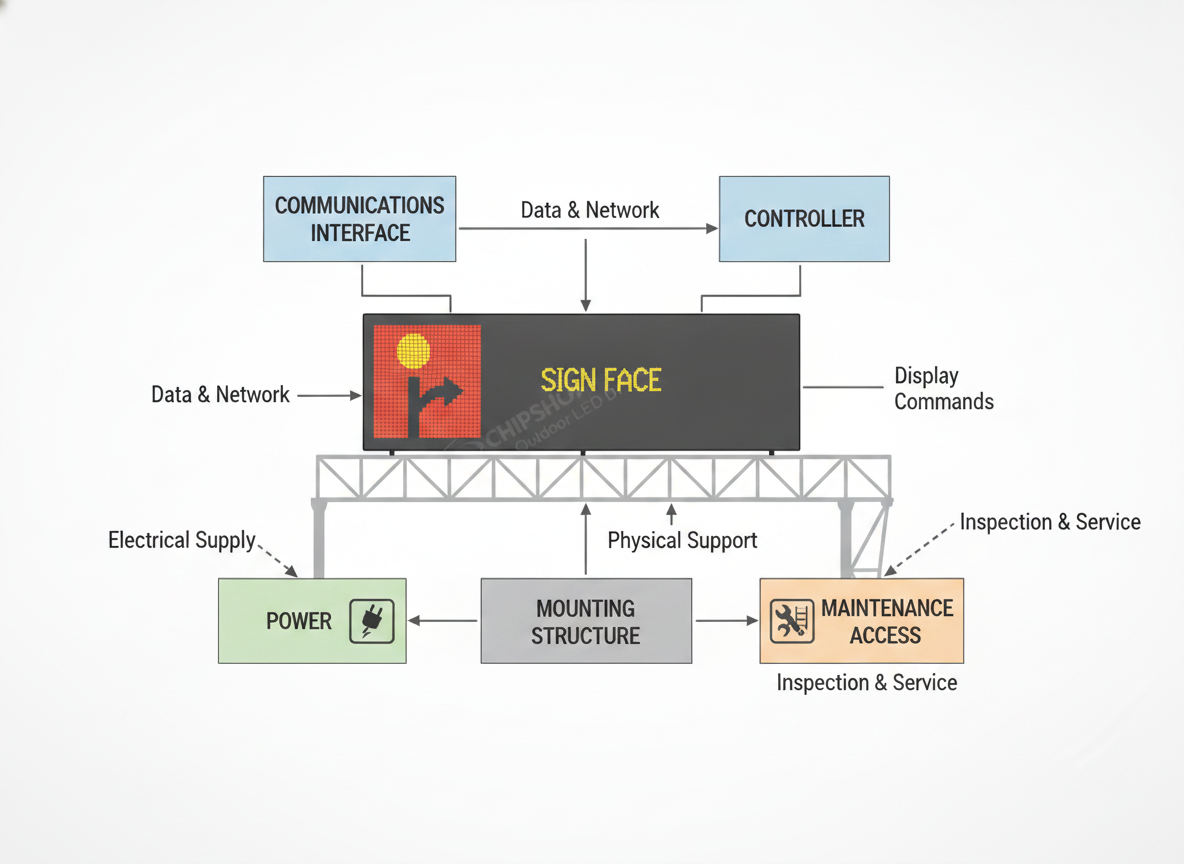
The best NTCIP 1203 VMS compliance checklist turns technical expectations into items a vendor can answer directly. Group the items by function so the bid remains readable and the reviewer can compare responses quickly.
- Controller and protocol support: ask the bidder to identify the NTCIP edition supported, the controller role, and any required object groups or message-handling limits.
- Communications setup: require the proposed network or field communications path, plus any agency-specific assumptions about addressing, security, or handoff.
- Display and cabinet basics: request the sign format, cabinet configuration, access method, and environmental or structural assumptions that affect installation.
- Power and mounting interfaces: make the bidder state the electrical and structural dependencies that the DOT must provide or verify.
- Testing and verification: ask for factory test procedures, field verification steps, and the documents the agency will use at review.
- Documentation and training: require O&M manuals, maintenance intervals, training materials, and any spare-parts or warranty terms the agency needs to own the asset.
- Exceptions and assumptions: make the bidder list anything excluded, optional, or dependent on a later design decision.
That structure mirrors the way agencies compare bids and helps avoid post-award arguments over what was included. If you want a browsing path for related project options, the Traffic & VMS solution category can be used as a navigation starting point, but the RFP should still stand on its own.
Map Requirements to Vendor Submittals
A good procurement file does not stop at the checklist. It connects each requirement to a document the vendor must submit so the agency can verify the claim before award or acceptance. That is especially important when the bid response looks polished but does not clearly prove the proposed system.
Technical Data and Compliance Statements
Start with a compliance matrix, product data sheets, and a statement of what the quoted system includes. Ask the bidder to list exceptions, assumptions, and optional items in plain language. If the proposal only offers a brochure-level description, the agency still does not know whether the vendor is actually committing to the requirement.
Shop Drawings and Interface Details
Request shop drawings that show dimensions, wiring, power, access, communications interfaces, and any structural dependencies. Those drawings let the reviewer check whether the system fits the site and whether the DOT’s own design team needs to resolve anything before installation. If the project has tight clearance or access limits, this is where those limits should appear.
Test Plans, FAT, and Acceptance Records
Ask for factory test procedures and the records the agency will use to verify operation. Keep the language tied to the agency’s process, because acceptance practices vary. The point is not to invent one national test standard. The point is to make sure the bidder shows how performance will be proven, not just claimed.
Operations, Maintenance, and Training Materials
Require the O&M manual, maintenance interval guidance, training outline, and any spare-parts list the agency expects to own. If you want a submittal package that supports long-term ownership, do not leave those items to chance. They are part of the asset, not an afterthought.
Common Specification Gaps That Create Change Orders
The most common problems are not exotic technical failures. They are missing details that let bidders make different assumptions.
- Vague communications language can leave vendors guessing about the protocol level, timeout behavior, or network handoff.
- Unclear controller responsibility can make it hard to tell who owns message handling, scheduling, or field-side behavior.
- Missing environmental or structural details can force redesign after award.
- Weak testing and acceptance wording can delay sign-off because the agency and contractor do not agree on proof.
- Incomplete documentation requests can leave the procurement file short on evidence.
- Mismatched review steps can create extra cycles between engineering, procurement, and operations.
These are the kinds of gaps that show up in project-specific add-ons like ALDOT’s supplemental DMS requirements, which is why the buyer should treat such documents as cautionary examples, not as universal language. If you remove ambiguity before bid day, you usually reduce clarification requests and post-award rework.

Turn the Checklist Into an RFP-Ready Draft
The shortest safe path is straightforward: confirm the applicable standard, draft the technical requirements, attach the submittal list, and align acceptance language with the agency’s review process. Then route the package through engineering, procurement, and legal review before release. If the project needs a product-family starting point for internal discussion, use the gantry VMS option or the lightweight VMS option pages only as navigation aids while you verify the current spec fit. The RFP should still be the primary source of truth.
FAQs
What Does NTCIP Compliance Mean for a Highway VMS?
It means the sign can be controlled and monitored using the applicable NTCIP 1203 interface for DMS/VMS projects. For procurement, the important part is naming the exact edition and the agency acceptance basis, because "NTCIP compliant" by itself is too broad to settle a bid.
Does a Highway VMS Need to Be NTCIP Compliant?
Many US DOT and state projects reference NTCIP-style interoperability, but the requirement depends on the agency’s spec package and project scope. Check the current RFP template, the standard edition, and the agency’s review path before you write the compliance language.
What Should Be Included in the Vendor Submittal Package?
At minimum, ask for compliance statements, product data sheets, shop drawings, interface details, test procedures or records, and O&M materials. The goal is to make each requirement verifiable, not to collect a stack of brochures that do not prove the claim.
How Do FHWA Systems Engineering Documents Affect Procurement?
They help structure the project from need to requirements to verification. For a highway VMS, that usually means the agency should define what the system must do, what evidence proves it, and how acceptance will be documented before the RFP is issued.
What Are the Most Common Mistakes in a Highway VMS Specification?
The biggest mistakes are vague communications language, missing acceptance criteria, unclear controller responsibility, and incomplete submittal requests. Each one can create bid ambiguity or later change-order pressure, so the safer move is to make those items explicit in the procurement package.





