





NovaStar Video Processor Manuals
VX400 Pro: The optimal processor for indoor corporate setups (≤50 m²) pairing with Shine-Plus P1.9 or P2.6. (Note: To maintain 3,840Hz performance, limit each Gigabit port to a maximum load of 500,000 pixels).
👉 [Download NovaStar VX400 PRO Video Processor User Manual]
👉 [Download NovaStar VX400 PRO Video Processor Specifications]
👉 [Download NovaStar VX400 PRO Video Processor Quick Start Guide]
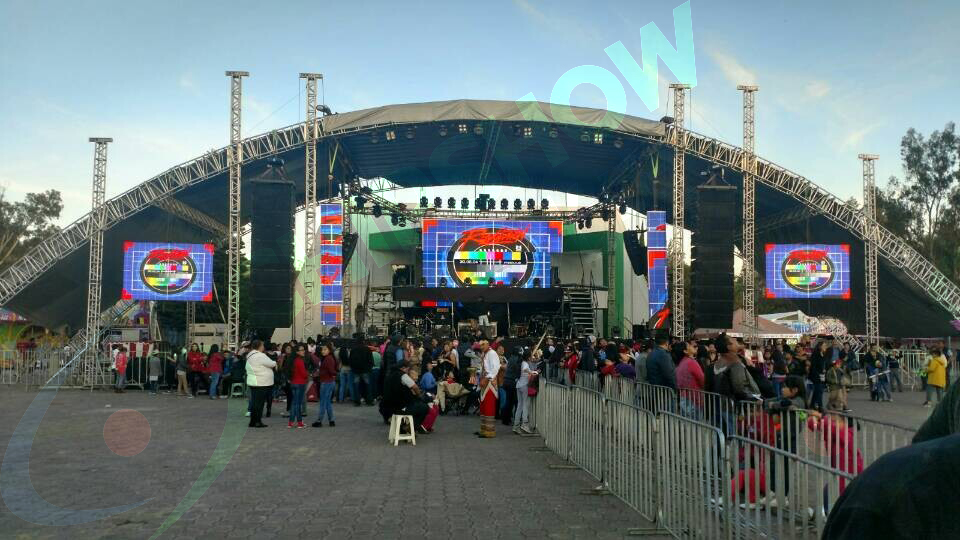
VX600 Pro / VX1000 Pro: The heavy-duty workhorses required for massive outdoor festival rigs requiring Genlock synchronization and multi-port processing.
👉 [Download NovaStar VX600 PRO Video Processor User Manual]
👉 [Download NovaStar VX600 PRO Video Processor Specifications]
👉 [Download NovaStar VX600 PRO Video Processor Quick Start Guide]
👉 [Download NovaStar VX1000 PRO Video Processor User Manual]
👉 [Download NovaStar VX1000 PRO Video Processor Specifications]
👉 [Download NovaStar VX1000 PRO Video Processor Quick Start Guide]
In premium live entertainment, commercial broadcasting, and high-stakes corporate product launches, AV integrators and production companies operate with zero margin for error. When an LED video wall exhibits visual artifacts on camera or suffers a mid-show blackout, the client does not blame the software; they blame the production provider.
As a manufacturer with over 25 years of engineering experience, Chipshow understands the operational realities of the staging industry. Frequently, the technical failures that plague live events are not caused by on-site crew errors, but rather by compromised hardware specifications finalized months before the screen ever reached the venue.
To protect your production reputation and asset ROI, technical directors must distinguish between two fundamental categories of LED performance: Factory-Locked Limitations and Field-Resolvable Anomalies. This guide breaks down these technical boundaries, provides industry-standard deployment rules, and serves as your central hub for essential NovaStar control resources.

1. Factory-Locked Limitations: What Cannot Be Fixed On-Site
The most critical mistake an AV buyer can make is assuming that a sub-par LED panel can be “calibrated” into a premium display using software on-site. If you procure equipment with compromised internal architecture, the following visual defects are locked into the hardware at the factory level and cannot be altered by your video processor or media server:
On-Camera Scan Lines & Rolling Flicker (The IC & Scan Rate Factor)
Amateur guides frequently confuse optical Moiré patterns with scan lines. Staging professionals know the difference. Moiré is a physical grid conflict between the screen and the camera lens, resolved by altering focal depth, changing shooting angles, or utilizing tighter pixel pitches.
Conversely, rolling black scan lines and camera flicker are strictly dictated by the driver IC model and the board’s scan rate. If a panel utilizes low-scan, budget-tier ICs, the display will pulse violently when captured by broadcast cameras at fast shutter speeds (e.g., 1/3000s). Chipshow’s premium staging panels, such as the C-Rock and Shine-Plus series, deploy high-scan driver ICs (like the 2153S) to guarantee native, flicker-free precision (≥3840Hz to 7680Hz) at the hardware level.
Motion Ghosting & Low-Grayscale Discoloration
When playing fast-paced content or dimming the screen for a quiet corporate keynote, budget screens often exhibit trailing shadows (ghosting) and color banding (mosaic patterns). This is caused by inferior blanking circuitry within the driver IC and poor LED binning. Once manufactured, low-grayscale distortion cannot be software-corrected. It requires premium component sourcing from day one.
Visible Seam Lines (The Need for Industrial Camera Calibration)
Visible bright or dark lines at cabinet seams ruin immersive stage designs. Attempting to micro-tweak seam lines manually via software on a live event site is highly inefficient and rarely yields perfect results. Flawless, pixel-perfect uniformity requires Industrial Camera Calibration performed on the factory floor. Chipshow calibrates every die-cast aluminum and carbon fiber cabinet using advanced optical systems before shipping, ensuring a gapless visual canvas right out of the flight case.
2. Field-Resolvable Anomalies: The Staging Crew’s Diagnostic Playbook
Unlike factory-locked defects, certain high-frequency issues are driven by environmental factors, cabling, or software mapping. A skilled staging crew can resolve these anomalies in minutes using proper diagnostic protocols:
Mid-Show Signal Blackouts (The 3-Second Visual Diagnostic)
A sudden loss of signal is a technical director’s worst nightmare. Before rebooting software, engineers should utilize the physical status indicators integrated into the rear of Chipshow rental cabinets:
Solid Red Light: The internal power supply is receiving voltage and functioning normally.
Flashing Green Light (1Hz / Once per second): The data loop is active, and the signal is perfectly synchronized.
Slow, Stuttering, or Absent Green Flash: The data chain is interrupted. If an entire section flashes out of sync, immediately inspect the master RJ45/Fiber data runs from the processor before replacing individual panels.
Scrambled Layout Mapping (The “Save to HW” Rule)
If the screen powers on but the image appears sliced, inverted, or disorganized, the receiving cards have lost their routing data. This is easily resolved by opening NovaLCT, re-mapping the Screen Connection according to your physical daisy-chain path, and hitting “Send.”
Critical Step: Technicians must always click “Save to HW” (Save to Hardware); otherwise, the mapping will erase the moment the screen loses power.
Immediate Breaker Tripping (The 15-Panel Daisy-Chain Limit)
When powering up a massive outdoor festival rig, an instantaneous breaker trip is rarely a faulty leakage protector—it is a cascading power overload. Staging power distribution has strict limits. As an industry rule of thumb, a single main power cable run should never daisy-chain more than 15 standard rental cabinets (the exact threshold depends on peak consumption and local voltage). Overloading triggers a massive inrush surge current. To prevent this, calculate your loads and segment your power runs accordingly.
3. Official NovaStar Control Software & Technical Resource Hub
To ensure your field engineers are equipped with reliable configuration tools, Chipshow provides direct access to industry-standard NovaStar software and video processor documentation.
NovaLCT Control Software (Windows/Mac) The essential desktop utility for screen mapping, receiving card configuration, and seam calibration on professional staging sets. 👉 [Download NovaLCT Software – Latest Stable Release]
ViPlex Express / ViPlex Handy The preferred wireless control and asynchronous scheduling suite for corporate lobbies, standalone displays, and Taurus-series (TB30/TB50) media players. 👉 [Download ViPlex Control Suite]
4. Securing Your Native .rcfgx Configuration Profiles
Premium event displays rely on specific receiving card configuration files (.rcfgx) to unleash their high-refresh ICs and recall factory seam calibration data.
Why doesn’t Chipshow offer generic .rcfgx files for public download? Because LED diodes possess microscopic physical variations across different manufacturing batches (LED Binning boundaries). Uploading a mismatched, generic configuration file downloaded from a public forum will corrupt your screen’s color accuracy, degrade its refresh rate, and potentially damage the receiving card firmware.
How to Request Your Batch-Specific Profile: To guarantee absolute broadcast compatibility and pixel accuracy, AV integrators and rental owners must utilize their exact factory-matched configuration.
Click the secure request link below.
Provide your Screen Model, Purchase Contract Number, or the Batch Number printed on the rear cabinet label.
Chipshow’s Global Engineering Team will cross-reference our factory database and email you the precise, calibrated .rcfgx file for your exact fleet.
👉 [Contact Engineering: Request Your Verified .RCFGX Profile]
Need immediate on-site technical support? Do not wait for an email. Contact the 24/7 Chipshow Emergency Support Line or your dedicated account executive for instant staging assistance.





